Why Traditional SaaS Sales Processes Lose Potential Customers
Selling software requires more than attracting website visitors and collecting contact details. Potential customers want to understand how a product works, whether it solves their business problems, what it costs and how easily it can fit into their existing operations.
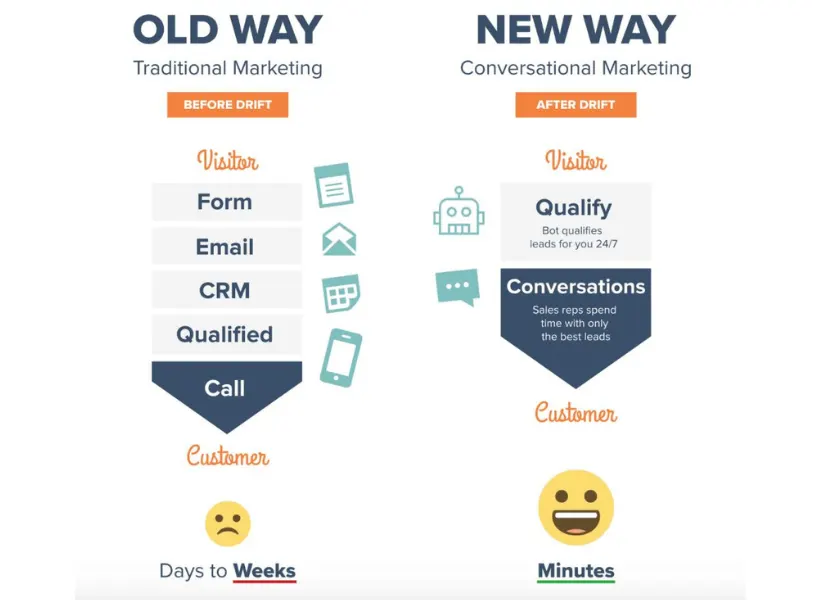
However, many SaaS companies still depend on sales processes that involve multiple steps:
- A visitor submits a website inquiry form.
- The sales team receives the lead.
- A representative sends an email or makes a phone call.
- The prospect waits for a product demonstration.
- The sales team shares pricing and follows up.
- The customer makes a purchase decision.
Each additional step creates another opportunity for a potential customer to lose interest.
Several common problems affect traditional SaaS sales processes.
Delayed responses to customer inquiries
When someone requests information about software, they usually have specific questions about features, pricing, integrations or implementation. If the sales team takes several hours to respond, the prospect may contact another provider.
Too many steps before a product demonstration
Not every prospect needs a scheduled meeting before understanding a product. Some only want a short explanation, a feature video or answers to a technical question.
Requiring every visitor to complete the same sales process can create unnecessary delays.
Disconnected communication channels
Sales representatives often manage conversations through emails, phone calls, website forms and separate messaging applications. Important customer information can become scattered across different systems.
Inconsistent lead follow-ups
Sales representatives may forget to contact prospects who requested pricing information or attended a product demonstration. Without a structured follow-up process, interested leads can remain unattended.
Limited visibility into customer requirements
When different team members handle the same prospect, they may not have access to previous conversations. Customers then need to explain their requirements repeatedly.
These problems make it difficult to maintain a consistent SaaS sales process.
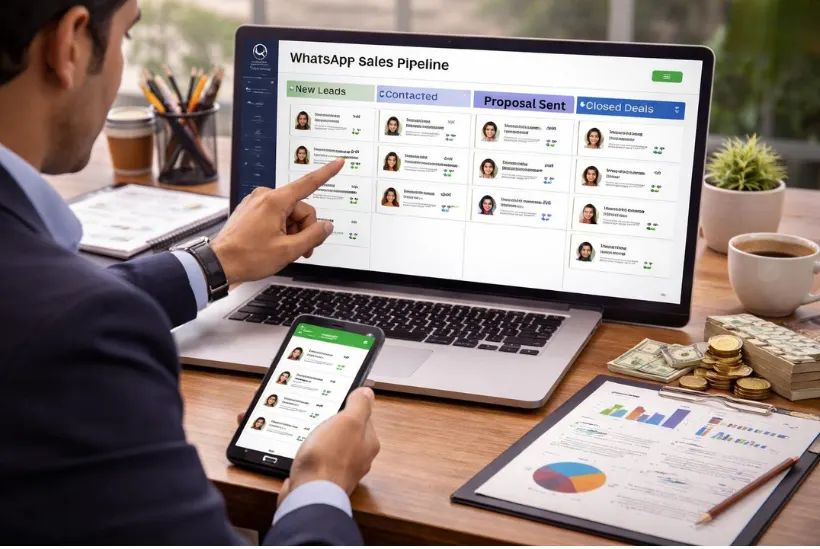
A WhatsApp-based sales process provides another way to manage these interactions. It allows potential customers to ask questions, receive product information, communicate with representatives and get relevant follow-ups through a familiar messaging channel.
What Is Conversational Sales on WhatsApp?
Conversational sales on WhatsApp is a sales approach in which businesses communicate with potential customers through WhatsApp instead of depending entirely on traditional sales calls, emails and scheduled meetings.
Rather than following a fixed sequence of sales activities, representatives respond according to each prospect’s questions, requirements and purchasing interest.
For example, consider someone visiting a SaaS company’s website to find customer relationship management software.
The visitor clicks the WhatsApp contact button and asks:
“Does your software support multiple sales representatives?”
The business can respond with relevant information, share a short product demonstration and explain the available subscription plans.
If the prospect wants additional information, the sales representative can continue the conversation or arrange a product demonstration.
This communication takes place within one conversation instead of requiring several disconnected interactions.
Conversational Sales vs Traditional SaaS Sales
| Traditional SaaS Sales | WhatsApp Conversational Sales |
| Depends heavily on emails and phone calls | Uses direct messaging conversations |
| Often requires scheduled meetings | Allows questions and answers through chat |
| Follow-ups may depend on manual reminders | Supports automated follow-up workflows |
| Customer information may remain scattered | Conversations can be managed through a shared inbox |
| Product information is often shared through separate channels | Supports sharing videos, documents and links in chat |
| Lead qualification may require manual calls | Chatbots can collect initial requirements |
Conversational selling does not remove the need for sales representatives. Instead, it helps them manage inquiries, provide relevant information and spend more time with qualified prospects.
For SaaS businesses with several products, subscription plans or customer segments, this approach can make communication easier to manage.
Why SaaS Companies Use WhatsApp for Sales
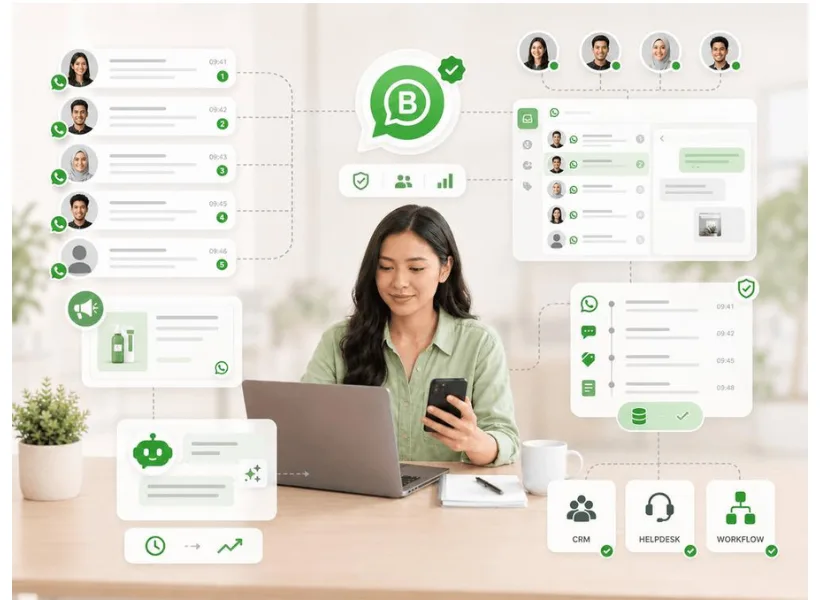
WhatsApp provides several communication features that can support the SaaS sales process.
Its usefulness depends on the company’s audience, communication requirements and how effectively it manages customer conversations.
1. Direct Communication With Potential Customers
Customers can send questions through WhatsApp without completing lengthy inquiry forms or waiting for an email response.
A SaaS company can use a website WhatsApp button, social media link or QR code to receive inquiries.
For example, a visitor interested in accounting software can ask about invoice management, subscription pricing or integrations directly through chat.
This gives the sales team an opportunity to understand the prospect’s requirements before recommending a suitable plan.
2. Automated Responses to Common Questions
SaaS sales teams receive similar questions regularly:
- What features does the software include?
- Which subscription plans are available?
- Does the software support multiple users?
- Can it integrate with existing business tools?
- Is technical assistance available?
A WhatsApp chatbot for SaaS can handle frequently asked questions using predefined responses or connected knowledge sources.
For questions requiring detailed assistance, the chatbot can direct the conversation to a human representative.
This reduces repetitive work while allowing customers to receive relevant information.
3. Product Demonstrations Through Messaging
A prospect does not always need a lengthy meeting to understand a software feature.
Businesses can share:
- Short product demonstration videos
- Feature screenshots
- Product documentation
- Pricing information
- Website and demo links
- Customer onboarding guides
These resources help prospects understand the software before deciding whether they need a detailed sales presentation.
4. Organized Lead Follow-Ups
WhatsApp sales automation can help businesses manage follow-ups based on customer actions.
For example:
- A visitor requests pricing information.
- The system records the inquiry.
- The sales team receives the conversation.
- The prospect receives a relevant follow-up, where permitted.
- A representative continues the discussion when the prospect responds.
Businesses must obtain the required permission for business-initiated messages and follow applicable WhatsApp messaging rules.
5. Shared Conversations Across Sales Teams
When multiple representatives handle inquiries, a shared WhatsApp inbox helps organize customer communication.
Depending on the platform, businesses can assign conversations, monitor responses and review previous messages.
This is particularly useful for SaaS companies handling inquiries from different industries, countries or customer segments.
How a WhatsApp-Based SaaS Sales Process Works
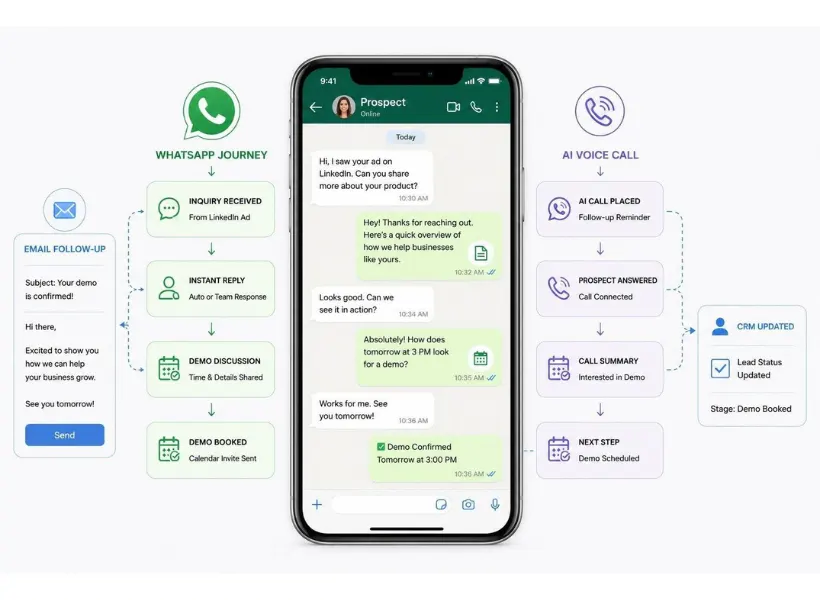
A structured WhatsApp sales process connects lead generation, qualification, product information, sales assistance and customer onboarding.
Here is how each stage can work.
1. Lead Capture and Initial Qualification
The first step is helping interested visitors contact the business through WhatsApp.
SaaS companies can place WhatsApp contact options on:
- Product and pricing pages
- Landing pages
- Facebook and Instagram advertisements
- Email campaigns
- Product demonstration pages
- Website contact sections
When a visitor sends a message, an automated greeting can request basic information.
Example conversation:
Customer: Hi, I need software for managing customer inquiries.
Business: Hello! Thanks for contacting us. Are you currently managing customer inquiries through spreadsheets, email or another CRM system?
Customer: We use spreadsheets.
Business: Thanks for sharing that. Approximately how many people handle customer inquiries in your company?
These questions help the sales team understand the customer’s requirements.
The qualification process should remain short. Asking too many questions before providing useful information can discourage prospects from continuing the conversation.
2. Automated Lead Screening and Assignment
Not every inquiry needs the same response.
Some prospects want general information, while others are ready to discuss pricing, integrations or implementation.
A WhatsApp chatbot can collect information such as:
- Customer name
- Company or business type
- Number of employees
- Required software features
- Current business challenges
- Preferred subscription plan
Based on these answers, the conversation can be assigned to the appropriate sales representative.
For example:
Small business inquiry: Direct the prospect towards the relevant product information and available subscription plans.
Enterprise inquiry: Assign the conversation to a representative who handles larger accounts and technical requirements.
Technical inquiry: Route the customer to the technical support team.
Automated lead routing helps sales teams handle inquiries according to their requirements rather than processing every conversation manually.
3. Product Information and Personalized Demonstrations
Once the sales team understands the prospect’s requirements, it can share relevant product information.
For example, a customer looking for project management software may want to understand:
- Task assignment
- Team collaboration
- Project reporting
- User permissions
- Third-party integrations
The representative can share a short demonstration video showing these features.
Instead of sending a general presentation covering every product function, the sales team can focus on the features related to the customer’s requirements.
Example message:
“Based on your requirements, our project management dashboard may be suitable for your team. Here is a short video showing how task assignments and project tracking work.”
If the prospect needs further assistance, the representative can arrange a live product demonstration.
4. Handling Sales Questions and Objections
Prospects often have questions before purchasing software.
Common concerns include:
- Is the subscription affordable?
- Can the software support our existing workflow?
- How difficult is implementation?
- Does it integrate with our current tools?
- What happens if we need technical assistance?
A sales representative should address these concerns with accurate product information.
For example:
Customer: We already use another CRM. Why should we change?
Sales representative: That depends on your current requirements. Could you share which CRM features are missing from your existing system? We can compare those requirements with our available features.
The representative can then share relevant documentation, integration details or a product demonstration.
The objective is to provide clear information rather than pressure the prospect into making a purchase.
5. Proposals, Payments and Customer Onboarding
When a prospect is ready to purchase, the sales team can share the next steps through WhatsApp.
These may include:
- Subscription plan details.
- A quotation or proposal document.
- Payment page or checkout link.
- Account registration instructions.
- Software access information.
- Customer onboarding documentation.
For example, after receiving confirmation, the business can send:
“Thank you for selecting our software. Your subscription details are available here: [Payment Link]. Once the payment is completed, our team will share the account setup instructions.”
Payment collection and account activation should follow the company’s approved payment and security procedures.
This keeps important purchase information accessible within the customer’s conversation.
How to Build a WhatsApp Sales Funnel for a SaaS Business
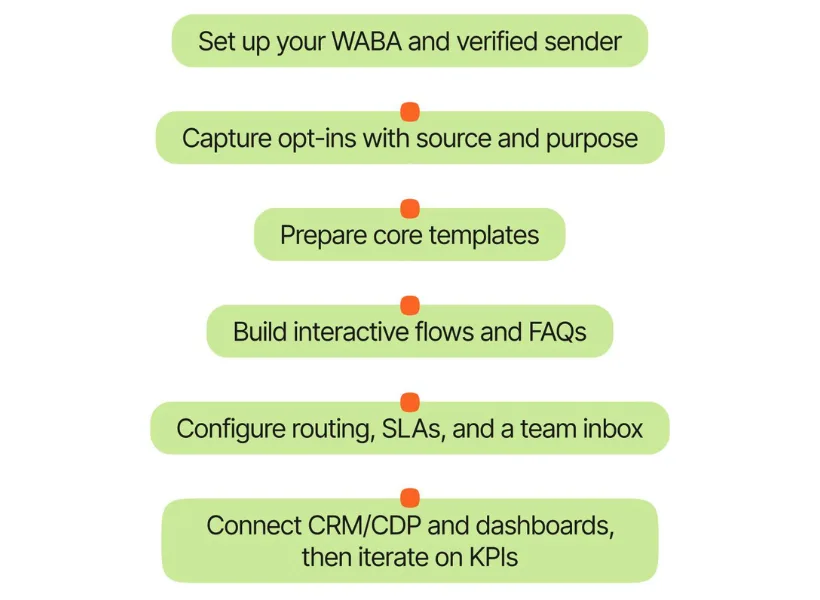
A successful WhatsApp sales funnel requires more than connecting a phone number to a messaging platform.
Businesses need a clear process for capturing inquiries, collecting customer information, assigning conversations and measuring sales performance.
The following implementation plan covers four phases.
Phase 1: WhatsApp Business API Setup
The WhatsApp Business Platform is suitable for businesses that need programmatic messaging, automation and integrations.
Unlike the standard WhatsApp Business application, the platform supports API-based communication through an approved technical setup.
The first phase should include the following tasks.
Connect the WhatsApp Business Platform
Complete the required Meta Business setup, business verification where applicable and phone number registration.
Select an appropriate WhatsApp Business Solution Provider or technical integration method.
Create a professional business profile
Include accurate business information such as:
- Company name
- Website
- Business description
- Support contact details
- Business email address
Connect the website and lead sources
Add WhatsApp contact links to relevant website pages, product pages and advertising campaigns.
Make it easy for visitors to contact the sales team.
Prepare message templates
Create relevant message templates for business-initiated communication, including permitted follow-ups and notifications.
Submit templates for approval where required by the WhatsApp Business Platform.
Define sales responsibilities
Decide which team members will manage new inquiries, product demonstrations, pricing questions and technical discussions.
Phase 1 objective: Establish a working WhatsApp communication setup with clear sales responsibilities.
Phase 2: Lead Management and Automation
After completing the initial setup, configure the workflows that manage incoming inquiries.
Create lead qualification questions
Prepare a short sequence of questions to understand customer requirements.
For a SaaS company, these may include:
- What type of software are you looking for?
- Which business problem do you want to solve?
- How many team members will use the software?
- Which features are important to your business?
Configure automated replies
Prepare responses for frequently asked questions about product features, subscription plans, demonstrations and technical requirements.
Set up conversation assignment
Assign inquiries to appropriate sales representatives based on product interest, customer type or business requirements.
Connect relevant business systems
Where supported, connect WhatsApp conversations with CRM software, lead management systems and other business applications.
This helps the sales team maintain customer information and follow-up records.
Prepare follow-up workflows
Create follow-up messages for prospects who have requested information but have not completed the next step.
Only send business-initiated messages when the required permission and template conditions are satisfied.
Phase 2 objective: Organize incoming leads and reduce repetitive manual communication.
Phase 3: Testing and Performance Measurement
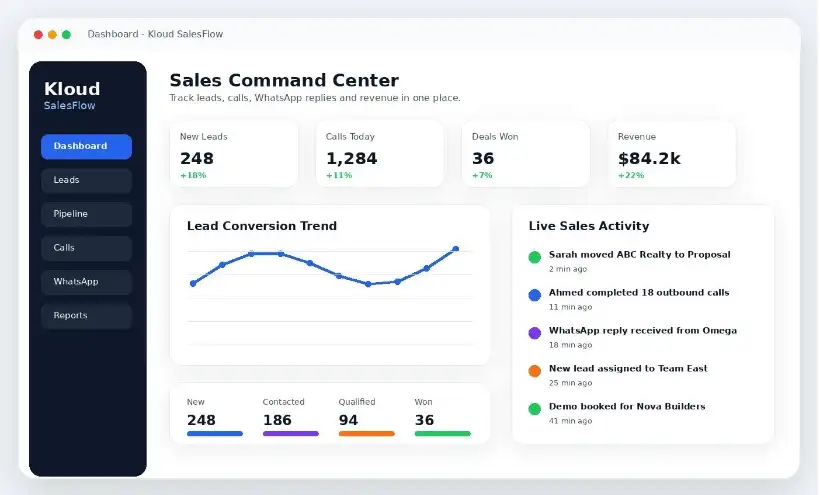
Before using the same workflow for all inquiries, test it with a smaller group of conversations.
Review the following areas:
Response accuracy
Check whether automated replies provide correct information about products, pricing and features.
Lead qualification
Determine whether the questions collect enough information for sales representatives to understand customer requirements.
Conversation assignment
Check whether inquiries reach the correct team member.
Follow-up delivery
Review whether approved templates and permitted messages are being delivered as expected.
Customer experience
Read conversation records to identify confusing questions, repetitive messages and unnecessary steps.
Important SaaS Sales Metrics to Track
| Metric | What It Measures |
| First Response Time | Time taken to respond to a new inquiry |
| Lead Qualification Rate | Percentage of inquiries that meet defined sales criteria |
| Demo Booking Rate | Percentage of qualified leads booking demonstrations |
| Demo Attendance Rate | Percentage of booked demonstrations attended |
| Lead-to-Customer Conversion Rate | Percentage of leads becoming paying customers |
| Follow-Up Response Rate | Percentage of follow-up messages receiving responses |
| Sales Cycle Length | Time between initial inquiry and purchase |
| Revenue per Customer | Revenue generated from acquired customers |
These metrics should be measured using actual CRM and messaging data. Results will differ according to product pricing, target market, sales process and customer requirements.
Phase 3 objective: Identify problems in the sales process and measure performance before expanding the workflow.
Phase 4: Improving and Scaling the Sales Process
Once the basic process works reliably, SaaS companies can expand their WhatsApp sales operations.
Consider the following improvements:
Create separate workflows for different products
If your company offers multiple software solutions, prepare separate qualification paths for each product.
Improve chatbot responses
Review unanswered questions and update the chatbot’s knowledge sources and predefined responses.
Improve lead assignment
Assign high-priority inquiries to representatives who have the relevant product knowledge.
Review sales conversations
Identify common customer objections and prepare better responses using accurate product information.
Automate relevant customer notifications
Use permitted WhatsApp notifications for account updates, appointment reminders and other customer-requested information.
Review performance regularly
Compare conversion rates, response times and customer feedback to identify areas that require improvement.
Phase 4 objective: Maintain a consistent WhatsApp sales process as inquiry volume increases.
WhatsApp Sales Strategies for SaaS Companies
Different prospects require different communication approaches. A visitor requesting a product demonstration should not receive the same messages as someone who has only asked for general information.
Here are five practical WhatsApp sales strategies for SaaS companies.
Strategy 1: Respond to Product Inquiries Quickly
When someone asks about a software feature, provide relevant information instead of sending a generic promotional message.
For example:
Customer: Does your software support automated invoice generation?
Business: Yes, our software includes invoice generation features. Would you like the product documentation or a short demonstration?
This response addresses the customer’s question and gives them a clear next step.
Best suited for: SaaS companies receiving inquiries through website pages, paid advertisements and social media.
Strategy 2: Create Follow-Up Sequences
Some prospects need additional time before making a purchase decision.
A structured follow-up process can help maintain communication without repeatedly sending the same message.
Example sequence:
Day 1 – Product Information
“Thank you for your interest in our software. Here is the feature guide we discussed. Please let us know if you have any questions.”
Day 3 – Additional Assistance
“Would you like help understanding how the reporting features can fit your business requirements?”
Day 7 – Product Demonstration
“We can arrange a short demonstration covering the features relevant to your team. Would you like to schedule one?”
Day 14 – Follow-Up
“Would you still like assistance with your software requirements? We can share the relevant information whenever you need it.”
These are illustrative follow-up messages, not permission to send messages without the required consent and approved templates.
Each communication should relate to the customer’s original inquiry and respect their messaging preferences.
Best suited for: B2B SaaS companies with longer purchasing cycles.
Strategy 3: Convert Free Trial Users into Paying Customers
Free trial users may understand the software but still need assistance before purchasing a subscription.
WhatsApp can help businesses communicate relevant onboarding information and answer questions.
Example communication flow:
Trial Registration
“Welcome! Your account has been created successfully. Here is the setup guide for your software.”
Initial Usage
“Have you completed your account configuration? Our team can help if you need assistance.”
Feature Assistance
“Would you like a short explanation of the reporting feature? We can share the relevant instructions.”
Trial Expiration Reminder
“Your trial period is scheduled to end on [Date]. You can review the available subscription plans here: [Plan Link].”
These communications should follow applicable messaging permissions and template requirements.
Best suited for: Product-led SaaS companies offering free trials or limited free plans.
Strategy 4: Upsell Existing SaaS Customers
Existing customers may require additional software features as their businesses grow.
Instead of sending the same upgrade promotion to every customer, identify relevant requirements.
For example:
A customer using a basic subscription asks whether additional team members can access the platform.
The representative can explain:
- Available user limits
- Additional subscription options
- Relevant team management features
- Upgrade requirements
- Associated pricing
This helps customers understand whether a higher subscription plan meets their needs.
Best suited for: SaaS companies offering multiple subscription plans, add-ons or usage-based features.
Strategy 5: Re-Engage Inactive Leads and Customers
Some prospects stop responding after requesting a quotation or attending a product demonstration.
Others may stop using the software because of implementation difficulties or changing business requirements.
A relevant follow-up can help identify the reason.
Example message:
“Hello [Name], you previously contacted us regarding our customer management software. Are you still looking for a solution? We can help with any questions about the available features.”
For former customers:
“Hello [Name], we wanted to check whether you need any assistance with your previous software requirements. Our team can help if your business needs have changed.”
Avoid sending repeated messages to people who have opted out or who have not given the required permission.
Best suited for: SaaS companies managing long sales cycles and customer retention activities.
WhatsApp Message Templates for SaaS Sales
The following examples can help sales teams prepare consistent customer communication.
Actual business-initiated messages must use approved WhatsApp templates where required.
1. New Lead Inquiry
“Hello {{1}}, thank you for contacting {{2}}. Could you share which software features your business currently needs? Our team will help you with the relevant information.”
2. Product Demonstration Confirmation
“Hello {{1}}, your product demonstration is scheduled for {{2}} at {{3}}. Please let us know if you have any specific features you would like us to cover.”
3. Pricing Information
“Hello {{1}}, here are the subscription details you requested: {{2}}. Please contact our team if you need clarification about the available plans.”
4. Trial Account Reminder
“Hello {{1}}, your trial account is scheduled to expire on {{2}}. You can review the available subscription options here: {{3}}.”
5. Proposal Follow-Up
“Hello {{1}}, we have shared the proposal for your software requirements. Please let us know if you have any questions about the features, pricing or implementation process.”
6. Customer Onboarding
“Hello {{1}}, thank you for choosing {{2}}. Your account setup instructions are available here: {{3}}. Our support team can assist with any setup questions.”
Message writing tip: Keep messages relevant to the customer’s inquiry. Use clear language, accurate information and a specific next step. Avoid sending repeated promotional messages or making claims that your software cannot support.
Common Mistakes to Avoid When Using WhatsApp for SaaS Sales
WhatsApp can support lead management and sales communication, but poor implementation can create additional problems.
Here are common mistakes SaaS businesses should avoid.
1. Sending Messages Without Proper Permission
Businesses must follow WhatsApp’s requirements for contacting users.
Obtain the required permission before sending business-initiated communications and provide a clear way for recipients to manage their messaging preferences.
2. Using Chatbots for Every Conversation
Automation is useful for common questions and basic lead qualification. However, complex pricing discussions, technical questions and contract negotiations may require human assistance.
Provide a clear path to a sales representative.
3. Asking Too Many Questions
A lengthy chatbot questionnaire can discourage potential customers.
Collect only the information required to understand the prospect’s needs and direct the inquiry to the correct team.
4. Sending Irrelevant Follow-Ups
Repeated messages without useful information can annoy recipients.
Each follow-up should have a clear purpose and respect the customer’s communication preferences.
5. Ignoring Conversation Records
When sales representatives cannot review previous interactions, customers may need to repeat their requirements.
Use a shared inbox or suitable CRM integration to maintain conversation history.
6. Not Measuring Sales Performance
Sending more messages does not automatically mean generating more customers.
Track lead quality, demonstration bookings, conversion rates and revenue to understand whether WhatsApp contributes to your sales process.
Important WhatsApp Business API Rules for SaaS Companies
SaaS companies using the WhatsApp Business Platform should understand its messaging requirements before creating automated sales workflows.
The following rules are important.
Customer permission: Businesses must obtain the required opt-in before contacting people through WhatsApp. Clearly explain which business will send messages and what type of communication recipients can expect.
Approved message templates: Business-initiated conversations must use approved message templates.
24-hour customer service window: When a customer sends a message, a 24-hour customer service window opens or resets with each new user message. During this period, businesses can respond with free-form messages. Outside this window, approved templates are required for business-initiated messages.
Respect opt-out requests: If a customer asks to stop receiving messages, businesses must respect that request.
Relevant communication: Send messages that relate to customer interests, inquiries or the permissions they have provided.
Human support: Automated responses should include an accessible route to human assistance.
Businesses should review the official WhatsApp Business Messaging Policy regularly because platform requirements can change.
How WatConnect Helps SaaS Businesses Manage WhatsApp Sales
Managing customer inquiries through individual WhatsApp conversations becomes difficult when a SaaS company receives leads from multiple sources.
WatConnect provides WhatsApp marketing and engagement features that can help businesses organize customer communication, automate responses and manage sales-related conversations.
Here are some relevant capabilities.
Automate Initial Customer Responses
WatConnect supports WhatsApp chatbot automation that can help answer common customer questions and collect initial inquiry details.
For SaaS businesses, these workflows can cover product information, pricing inquiries, demonstration requests and frequently asked questions.
Manage Customer Conversations Through a Shared Team Inbox
When several sales representatives handle customer inquiries, managing conversations through one organized system becomes important.
WatConnect provides team conversation management features that help businesses assign and manage customer chats.
This makes it easier for sales teams to maintain communication records and coordinate responses.
Send Approved WhatsApp Business Messages
SaaS businesses can use WhatsApp message templates for relevant business communication.
WatConnect supports template management and bulk messaging features, helping businesses organize permitted messaging campaigns.
Automate Customer Notifications
Customer communication does not end when someone purchases a subscription.
Businesses may need to send account-related notifications, onboarding information and other relevant updates.
WatConnect supports automated WhatsApp notifications based on configured business workflows.
Manage Messaging Campaign Performance
Understanding campaign activity helps businesses review their communication process.
WatConnect provides analytics for messaging activity, including delivery, read and click information where supported.
These details can help teams review campaign performance and improve their messaging approach.
Connect WhatsApp With Business Workflows
SaaS companies may already use forms, websites and other business applications to collect leads.
WatConnect supports API integrations that can connect WhatsApp messaging with relevant business workflows.
This can help businesses automate notifications and manage customer communication without depending entirely on manual processes.
For companies planning to improve their WhatsApp sales process, WatConnect provides features for messaging, chatbot automation, team communication and workflow integration.
Learn more about WatConnect WhatsApp Marketing and Automation Platform and its features for business communication.
Frequently Asked Questions
1. What is conversational sales on WhatsApp for SaaS?
Conversational sales on WhatsApp for SaaS is a sales approach that uses WhatsApp messaging to communicate with potential software customers. Businesses can answer product questions, qualify leads, share demonstrations, provide pricing information and manage follow-ups through conversations.
2. How can SaaS companies use WhatsApp to generate leads?
SaaS companies can add WhatsApp contact links to their websites, landing pages, advertisements and social media profiles. Interested visitors can contact the sales team directly. Chatbots can collect basic requirements and route qualified inquiries to appropriate representatives.
3. Is WhatsApp Business API suitable for SaaS companies?
Yes. WhatsApp Business API is suitable for SaaS companies that need automated messaging, chatbot workflows, integrations and team-based conversation management. It can support customer inquiries, lead qualification, notifications and sales communication.
4. How can WhatsApp automation improve SaaS sales?
WhatsApp automation can reduce repetitive manual tasks by handling common questions, collecting lead information, assigning conversations and managing permitted follow-ups. Sales representatives can then focus on product demonstrations, technical discussions and customer requirements.
5. Can SaaS companies use WhatsApp chatbots for lead qualification?
Yes. A WhatsApp chatbot can ask potential customers about their business type, software requirements, team size and preferred features. Based on their answers, the chatbot can direct the inquiry to the appropriate sales representative.
6. How can WhatsApp help convert free trial users into paying customers?
Businesses can use WhatsApp to share onboarding instructions, explain software features, answer setup questions and send permitted trial-related reminders. Timely assistance can help users understand the product and make an informed subscription decision.
7. Can WhatsApp integrate with CRM software?
Yes. The WhatsApp Business Platform supports integrations with CRM systems through APIs and compatible software solutions. Depending on the integration, businesses can synchronize customer information, manage conversations and maintain sales records.
8. What is the difference between WhatsApp Business App and WhatsApp Business API for SaaS companies?
The WhatsApp Business App is primarily designed for small businesses managing conversations through an application. The WhatsApp Business Platform provides API-based capabilities for businesses requiring integrations, automated workflows and larger-scale team communication.
9. Can SaaS companies send automated follow-up messages on WhatsApp?
Yes. Businesses can configure automated follow-ups based on customer actions and business workflows. However, messages sent outside the 24-hour customer service window must use approved templates, and businesses must comply with applicable permission and messaging requirements.
10. How can WatConnect help SaaS companies with WhatsApp sales?
WatConnect provides features such as WhatsApp chatbot automation, bulk messaging, template management, automated notifications, team inbox management and API integrations. SaaS businesses can use these capabilities to organize customer inquiries and manage WhatsApp communication workflows.
Conclusion
SaaS sales require consistent communication, clear product information and timely assistance. Traditional methods such as emails, phone calls and scheduled demonstrations remain useful, but they do not always provide the response speed and convenience that potential customers expect.
Conversational sales on WhatsApp gives SaaS companies another way to manage customer inquiries, qualify leads, share product information and coordinate follow-ups.
A well-planned process combines automation with human assistance. Chatbots can handle common questions and collect initial information, while sales representatives manage detailed product discussions and purchasing decisions.
With features such as chatbot automation, shared inbox management, message templates and API integrations, WatConnect can help SaaS businesses organize their WhatsApp communication and manage sales-related customer interactions.
The key is to build a process around customer requirements, relevant communication and measurable sales outcomes.