

Customer support is no longer limited to office hours. Customers may have questions about orders, products, services, payments, or bookings at any time of the day. When they do not receive a timely response, frustration can increase, and they may look for another business that is easier to contact.
This is where WhatsApp for 24/7 customer support can make a real difference. WhatsApp allows businesses to stay connected with customers through a familiar messaging channel while using automated replies, structured support options, team access, and well-organized follow-ups.
However, 24/7 customer support does not mean that a business needs employees available every minute of the day. A well-planned WhatsApp support system can answer common questions instantly, collect the right information, guide customers toward relevant solutions, and pass more complex conversations to a support representative when required.
Businesses already using WhatsApp for customer communication can also connect their support strategy with broader communication activities. For example, understanding how to use WhatsApp for business growth can help businesses use the platform more effectively across customer engagement, communication, and support.
Why Businesses Need WhatsApp for 24/7 Customer Support
Customers prefer quick and convenient communication. Calling a support number can involve waiting, while email responses may take several hours or even longer. WhatsApp provides a simpler option because customers can send a message whenever they need assistance and continue the conversation from their mobile device.
For a business, this creates an opportunity to provide faster first responses and improve customer convenience. Common questions can be addressed immediately, while important or complicated issues can be organized for the right support team.
Using WhatsApp for customer support can help businesses:
- Provide faster initial responses to customer questions
- Reduce repetitive work for support teams
- Keep customer conversations in one messaging channel
- Share images, documents, locations, and useful information easily
- Collect customer details before assigning a support request
- Support customers outside normal working hours
- Improve follow-ups on unresolved issues
- Create a more convenient customer experience
The key is to build a structured process rather than simply asking customers to send a message and waiting for someone to reply.
How to Use WhatsApp for 24/7 Customer Support: Start With a Clear Support Process
Before setting up automated responses, businesses should understand the types of questions they receive most often. A support process becomes much easier to manage when common customer needs are grouped into categories.
For example, customers may frequently contact a business for order updates, pricing details, appointment information, technical support, payment issues, or general product questions. These requests can be organized into a simple customer journey.
| Customer Need | Recommended WhatsApp Support Action |
|---|---|
| Order or service status | Ask for the relevant order or reference details |
| Product information | Share product details, images, or useful information |
| Pricing questions | Provide current pricing or guide the customer to the right option |
| Technical problem | Collect issue details and provide basic troubleshooting steps |
| Appointment request | Guide the customer through booking or rescheduling |
| Complex complaint | Collect details and route the conversation to a support representative |
When support requests are categorized properly, customers can reach the right solution faster and support teams can manage conversations more efficiently.
1. Set Up a Professional WhatsApp Business Profile
The first step is to create a clear and professional business presence. Customers should immediately know who they are contacting and what type of assistance they can receive.
A complete business profile should include relevant details such as the business name, description, website, email address, and business hours. Even when a company provides automated support outside working hours, clearly displaying business information helps customers understand when live support representatives are available.
A professional profile also builds trust. Customers are more likely to continue a support conversation when they can clearly identify the business and understand how the communication channel is being used.
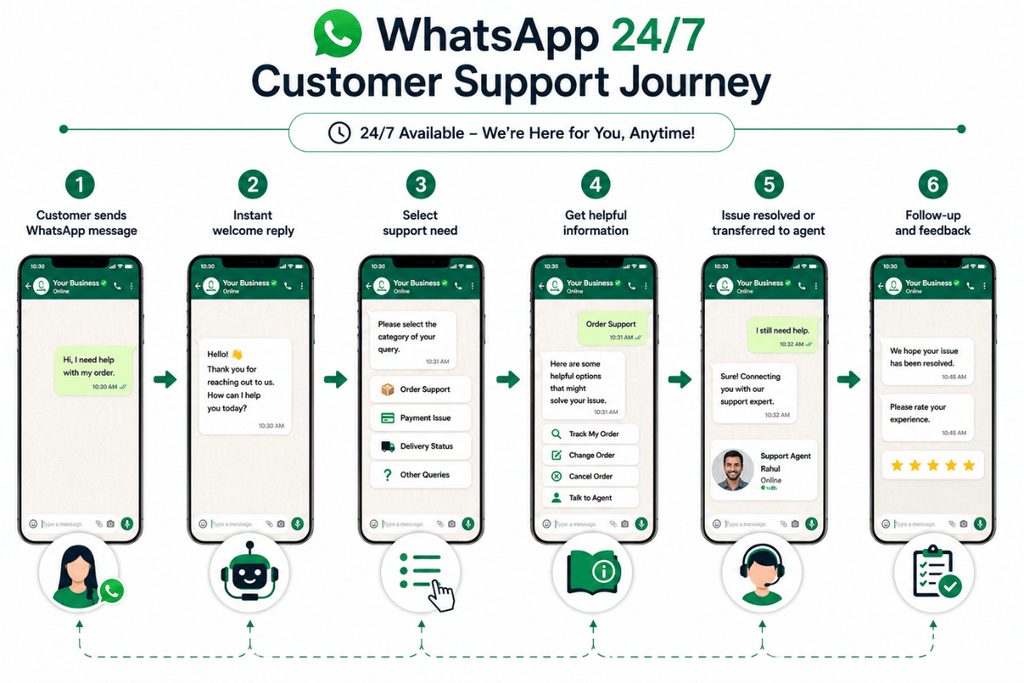
2. Create an Instant Welcome Message
The first customer response is important. When someone sends a message, they should not feel that their request has disappeared into an unattended inbox.
A welcome message can acknowledge the customer immediately and guide them toward the next step. Instead of using a vague response, provide useful options based on common customer needs.
For example:
Hello! Thank you for contacting us. We are here to help. Please tell us what you need assistance with, such as order information, product details, billing, technical support, or another customer service request.
A message like this reassures the customer that their request has been received while encouraging them to provide useful information from the beginning.
3. Use Automated Replies for Common Questions
Automated replies are one of the most practical ways to provide support outside normal working hours. They are especially useful for frequently asked questions that do not require a support representative to investigate the customer’s individual situation.
Businesses can prepare responses for questions related to:
- Business hours
- Product availability
- Pricing information
- Delivery or service timelines
- Booking details
- Basic account questions
- Return or cancellation policies
- General company information
The goal is not to create a complicated conversation with too many options. Customers should receive clear information and easily understand what to do next.
Businesses that already send customer updates or promotional communications should also keep their communication organized. A useful guide on WhatsApp marketing for businesses can help create a more structured approach to customer communication without mixing promotional conversations with important support requests.
4. Create a Simple Customer Support Menu
A support menu can help customers explain what they need without typing a long message. This is particularly useful when a business receives a high volume of different types of customer requests.
For example, a simple support menu could guide customers through options such as:
- Order or Service Status
- Product Information
- Billing and Payment
- Technical Support
- Appointment Assistance
- Speak With Customer Support
Each option should lead to a relevant next step. For example, if a customer selects technical support, the system can ask for the product name, issue description, and any useful screenshots before the conversation is reviewed by the support team.
This saves time for both the customer and the business.
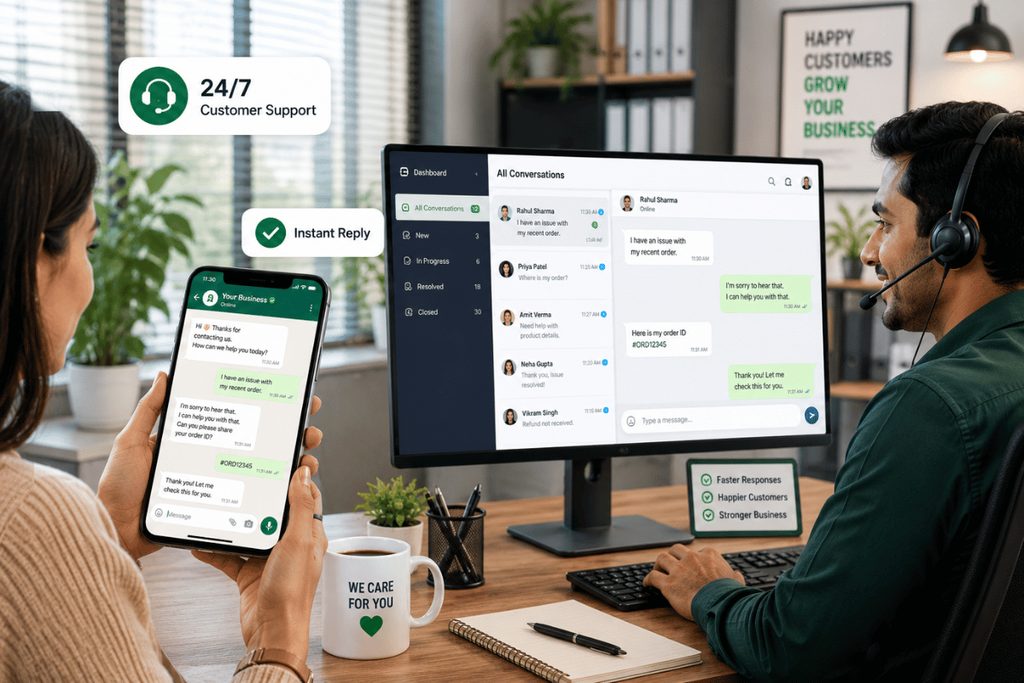
5. Collect the Right Information Before Support Handoff
One common problem in customer service is asking the customer to repeat the same information several times. A better WhatsApp support workflow collects the essential details early in the conversation.
Depending on the type of request, this may include:
- Customer name
- Order or reference number
- Product or service name
- Description of the issue
- Screenshot or image
- Preferred contact details
When the support representative receives the conversation, they should already have enough information to understand the basic issue.
This makes the handoff smoother and reduces unnecessary back-and-forth messages.
Image Prompt 1
6. Make It Easy to Reach a Human Support Representative
Automated replies are useful, but they should not become a barrier between the customer and real support.
Some issues require personal attention, especially complaints, account-specific concerns, payment problems, technical difficulties, or situations where the customer is becoming frustrated.
Customers should have a clear way to request additional help. A simple option such as “Speak with Support” can move the conversation into the appropriate queue.
The transition should be smooth. The support representative should be able to see the previous messages and customer details so that the customer does not have to start from the beginning.
A strong customer support experience combines quick automated assistance with timely human help when the situation requires it.
7. Organize Customer Conversations for Your Team
As customer inquiries increase, managing everything from a single phone can become difficult. Multiple team members may need to handle conversations, follow up on unresolved requests, and make sure that no customer message is missed.
A more organized support process can allow businesses to:
- Assign conversations to the right team member
- Separate sales and support inquiries
- Track unresolved customer requests
- Follow up on pending issues
- Avoid duplicate responses
- Maintain better conversation records
Follow-up is particularly important because many customer issues are not resolved in one conversation. Businesses can benefit from structured follow-up practices similar to those discussed in how to manage customer communication on WhatsApp, especially when customers need updates after their initial request.
8. Use WhatsApp for Proactive Customer Updates
Good customer support is not always about waiting for customers to ask questions. In many situations, businesses can reduce incoming support requests by sending useful updates at the right time.
Examples may include:
- Appointment reminders
- Service confirmations
- Delivery updates
- Booking information
- Payment reminders
- Important customer notifications
These messages can help customers stay informed and reduce the number of repetitive “What is happening with my order?” or “When is my appointment?” questions.
For businesses that communicate with larger customer groups, it is also important to understand the difference between individual support conversations and larger-scale messaging. The guide on how to send bulk WhatsApp messages can provide useful context for businesses planning organized customer communication campaigns.
9. Track and Improve Your WhatsApp Support Performance
A 24/7 customer support system should be reviewed regularly. Businesses need to understand whether customers are receiving useful responses and whether common problems are being resolved efficiently.
Important areas to monitor include response speed, unresolved conversations, repeated customer questions, and the types of issues that require additional support.
| Metric | Why It Matters |
|---|---|
| First Response Time | Shows how quickly customers receive an initial reply |
| Resolution Time | Measures how long it takes to solve a customer issue |
| Unresolved Conversations | Helps identify requests that need follow-up |
| Repeat Questions | Shows where customer information may be unclear |
| Support Volume | Helps businesses understand busy periods and common issues |
| Customer Feedback | Provides direct insight into the support experience |
Regular reviews can reveal gaps in the support process. For example, if customers repeatedly ask the same question, the business may need a better automated response or clearer information on its website.
Best Practices for WhatsApp 24/7 Customer Support
Keep Messages Clear and Natural
WhatsApp conversations should feel easy to understand. Avoid overly formal language and long blocks of unnecessary information. Customers should quickly know what information they need and what action they should take.
Do Not Overcomplicate the Support Journey
Too many menu options can confuse customers. Keep the main support categories focused on the most common customer needs.
Always Provide a Clear Next Step
Every support message should help move the conversation forward. The customer should know whether they need to provide more details, wait for an update, select an option, or speak with a support representative.
Follow Up on Unresolved Requests
A customer should not need to send multiple reminders for the same problem. Tracking pending conversations and following up at the appropriate time can significantly improve the support experience.
Keep Customer Communication Relevant
Businesses should avoid sending unnecessary messages. Customer communication should have a clear purpose, whether it is providing support, sharing an important update, confirming a service, or responding to a customer request.
Review Frequently Asked Questions Regularly
Customer needs change over time. Review common questions and update your support responses whenever products, services, pricing, policies, or processes change.
Common Mistakes to Avoid
Many businesses set up WhatsApp customer support but fail to create a proper process behind it. This can result in missed messages, delayed responses, and confused customers.
One major mistake is relying only on a basic greeting message. A greeting is helpful, but it does not solve the customer’s problem. The conversation should continue with useful options or clear instructions.
Another mistake is making it difficult to reach a support representative. Customers with complex problems may become frustrated when they keep receiving the same automated responses.
Businesses should also avoid mixing every type of customer communication together without organization. Promotional messages, sales inquiries, service updates, and support requests should be managed with a clear purpose.
FAQs
Can WhatsApp really provide customer support 24/7?
Yes, WhatsApp can support a 24/7 customer service process when businesses combine instant replies, structured support options, and an organized system for handling customer requests. Common questions can receive immediate responses outside normal working hours, while more complicated issues can be collected and prepared for the appropriate support team.
The important point is that 24/7 availability does not necessarily mean that a human representative must actively answer every message at every hour. A well-planned process can keep customers informed, collect the right details, and make sure their request continues moving forward.
What type of customer questions can be answered through WhatsApp?
WhatsApp can be useful for many common customer service needs, including order updates, product information, pricing questions, booking assistance, appointment reminders, billing questions, basic troubleshooting, and general business information.
For more complicated cases, WhatsApp can still act as the first point of contact. The business can collect important details and route the customer to the right support representative instead of asking the customer to repeat the issue through another channel.
How can a business manage many WhatsApp customer conversations?
Businesses should create an organized process for assigning and tracking customer conversations. Different team members may handle sales, technical support, billing, or general customer service depending on the type of inquiry.
A structured workflow helps prevent duplicate replies and missed follow-ups. It also makes it easier to identify which customer requests are still pending and which ones have already been resolved.
Should customers always have an option to speak with a human?
Yes, customers should have a clear path to additional support when their problem cannot be solved through the initial WhatsApp conversation. Some issues require personal attention, investigation, or access to customer-specific information.
Making human support accessible helps prevent frustration and creates a better overall experience. The initial support process should save time, not make customers feel trapped in an endless series of automated messages.
How can WhatsApp reduce customer support workload?
WhatsApp can reduce repetitive work by handling frequently asked questions through prepared responses and structured customer journeys. Instead of answering the same business hours, pricing, booking, or policy questions repeatedly, support teams can focus more attention on issues that genuinely require their expertise.
It can also help businesses collect important information before a support representative reviews the request. This means the team can spend less time asking basic questions and more time working toward a solution.
How should businesses improve their WhatsApp customer support over time?
Businesses should regularly review customer conversations and identify repeated questions, common complaints, delayed responses, and unresolved requests. These insights can show where the support process needs improvement.
For example, a frequently asked question may need a clearer response, while a common customer problem may require better information on the website or a more detailed support process. Continuous improvement helps ensure that WhatsApp remains useful as customer expectations and business needs change.
Final Thoughts
Understanding how to use WhatsApp for 24/7 customer support is about creating a reliable customer communication process rather than simply replying to messages whenever they arrive.
A strong approach starts with clear support categories, instant responses, useful automated messages, proper information collection, organized team communication, and easy access to human support when necessary.
When businesses use WhatsApp with a well-planned workflow, customers can receive faster guidance while support teams spend less time handling repetitive questions. The result is a more organized, convenient, and customer-friendly support experience that can continue beyond normal business hours.