

Focus Keyword: How to Set Up a WhatsApp Product Catalog for Your Store
If you are running an online store or a local business, customers often contact you on WhatsApp to ask about your products, prices, availability, and other details. Replying to every customer with separate product photos and messages can take a lot of time. It can also make the shopping experience confusing when customers receive too many images and messages at once.
A WhatsApp Product Catalog helps solve this problem by organizing your products in one place. Instead of sending product details manually, you can create a digital product collection where customers can browse products, check prices, read descriptions, and choose what they are interested in.
In this guide, you will learn how to set up a WhatsApp Product Catalog for your store, how to add products, organize collections, improve product listings, and use your catalog more effectively for customer conversations and sales.
What Is a WhatsApp Product Catalog?
A WhatsApp Product Catalog is a digital product display created through WhatsApp Business. It allows businesses to showcase their products or services directly inside WhatsApp. Customers can browse available items without asking the business to send every product photo individually.
Each product listing can include important information such as product images, the product name, price, description, and other available details. This makes the shopping experience more organized and easier for customers.
For example, imagine a customer sends a message asking, “What products do you have?” Without a catalog, the business may need to send multiple photos, prices, and descriptions manually. With a WhatsApp Product Catalog, the customer can browse the available products from a structured catalog.

Why Should Your Store Use a WhatsApp Product Catalog?
Customers usually want product information quickly. If they have to wait for photos, prices, or replies, they may lose interest. A catalog gives them a simple way to explore products at their own speed.
It also helps your business maintain a more professional and organized product presentation. Instead of having different product details scattered across multiple chats, your catalog keeps important information together.
A WhatsApp Product Catalog can help your store in several ways:
| Benefit | How It Helps Your Store |
|---|---|
| Better product display | Customers can browse products in an organized format |
| Faster customer replies | You do not need to send every product photo manually |
| Clearer information | Product names, prices, and descriptions are available in one place |
| Easier product sharing | Individual products can be shared during customer conversations |
| Better customer experience | Customers can explore products before asking questions |
| More organized selling | Collections can group similar products together |
The biggest advantage is convenience. Customers are already using WhatsApp for communication, so showing products inside the same platform can make the buying journey feel easier and more direct.
How to Set Up a WhatsApp Product Catalog for Your Store
Setting up a catalog is simple when you prepare your product information before starting. It is a good idea to collect your product images, names, prices, and descriptions in advance. This will help you create more complete and consistent product listings.
Step 1: Open WhatsApp Business
First, open the WhatsApp Business application connected to your business account. Make sure your business profile is properly set up with your store name and relevant business information.
From the business tools section, find the Catalog option. This area will become the main place where you manage your products or services.
Once you open the catalog section, you can start adding your store items.
Step 2: Add a New Product
Select the option to add a new item. You will then be able to upload product images and enter product details.
Start with the product image because visuals are often the first thing customers notice. Use clear and high-quality images that show the actual product properly. Avoid cluttered images where the product is difficult to identify.
After uploading the image, add the product name and price. The product name should be clear and easy to understand. Avoid using complicated names that customers may not recognize.
For example, instead of writing:
New Item 2026
Use a descriptive name such as:
Cotton Blue Casual Shirt
The second option immediately tells customers what the product is.
Step 3: Write a Useful Product Description
A good product description should answer basic customer questions. It should explain what the product is and highlight the most useful details.
You do not need to write a very long description for every item. Focus on information that helps the customer understand the product.
Depending on your store, this may include:
- Product material
- Available size or variation
- Main features
- Important specifications
- Usage information
- Other useful product details
The goal is to reduce unnecessary back-and-forth messages. If customers can understand the important details directly from the catalog, your team can save time.
Step 4: Add More Product Details
Where available, you can add additional information to make your catalog more organized.
For stores with many products, keeping product information consistent can be especially useful. For example, using similar naming styles and descriptions makes the catalog easier to browse.
A structured listing could look like this:
| Product Detail | Example |
|---|---|
| Product Name | Premium Cotton T-Shirt |
| Price | Clearly displayed |
| Description | Material, fit, and product benefits |
| Product Image | Clear image showing the product |
| Category | Men’s Clothing |
| Additional Details | Relevant information for customers |
The exact details you use may depend on your business and product type.
Step 5: Save the Product
After adding the required information, review the listing before saving it. Check that the product name is correct, the image is clear, and the description does not contain mistakes.
Once everything looks correct, save the item. You can then continue adding more products to your WhatsApp Product Catalog.
How to Organize Products Using Collections
Adding products is only the first step. If your store has multiple items, customers should also be able to browse them easily.
This is where product collections can help.
You can group similar products into categories or collections. For example, a clothing store may organize products into categories such as:
- New Arrivals
- Men’s Clothing
- Women’s Clothing
- Best Sellers
- Seasonal Collection
- Special Offers
A beauty store could organize products into:
- Skincare
- Hair Care
- Makeup
- Best Sellers
- New Products
Collections make the catalog easier to explore. Instead of scrolling through a long list of unrelated products, customers can browse the category they are interested in.
Image Placement 2

How to Create Better Product Listings
A catalog is more useful when every product listing is clear and consistent. Good product listings can help customers understand products faster and make the catalog look more professional.
Use Clear Product Images
Product images should focus on the actual item. Customers should be able to understand what they are looking at without confusion.
Try to maintain a consistent visual style across your catalog. For example, if one product uses a clean white background and another uses a dark, crowded background, the catalog may look less organized.
Clear images help customers compare products more easily.
Keep Product Names Simple
Product names should describe the item clearly.
A good product name usually includes the main product type and an important identifying detail.
For example:
Wireless Bluetooth Earbuds
is clearer than:
Amazing New Product
Customers should understand the product without needing to open additional information.
Write Helpful Descriptions
Descriptions should provide useful details without becoming unnecessarily long.
A customer may want to know:
- What is this product?
- What makes it useful?
- What are the important specifications?
- Is there an important variation or feature?
Answering these questions can make the shopping experience smoother.
Keep Pricing Information Clear
Customers often ask for prices first. When pricing information is clearly displayed, you may receive fewer basic pricing questions.
Make sure the price information matches your current store pricing and update it when needed.
Understanding How to Set Up a WhatsApp Product Catalog for Your Store is only the first step. Keeping your catalog accurate and easy to browse is equally important.
Best Practices for Managing Your WhatsApp Product Catalog
Creating the catalog is not a one-time task. Your products, prices, availability, and collections may change over time. Regular catalog management helps keep customer information accurate.
Review Your Products Regularly
Check your catalog from time to time to make sure the information is still correct. Remove outdated items and update product details when necessary.
If customers see products that are no longer available, it can create frustration and lead to unnecessary conversations.
Keep Product Images Consistent
A catalog looks more professional when the product images follow a similar style. You do not need every image to be identical, but maintaining consistency can improve the browsing experience.
Try to keep product images:
- Clear
- High quality
- Properly focused
- Relevant to the product
- Easy to understand on a mobile screen
Update New Products Quickly
When your store launches new products, add them to the catalog as soon as possible. This gives customers another way to discover new items.
You can also organize new products into a separate collection so returning customers can easily see what has recently been added.
Check Product Information
Incorrect product names, outdated prices, or incomplete descriptions can create confusion.
Before publishing or updating a product, quickly review the information. A few minutes of checking can help create a better customer experience.
How Customers Can Use Your WhatsApp Product Catalog
From the customer side, the catalog should feel simple and easy to explore.
A typical customer journey may look like this:
Customer opens your WhatsApp Business profile → Views the product catalog → Browses products or collections → Opens a product → Checks product details → Shares or asks about the product → Continues the conversation
This is why product organization is important. The catalog is not only a list of items. It can become an important part of how customers discover your products and start conversations with your business.
WhatsApp Product Catalog vs Sending Products Manually
Many small businesses still send product photos individually through chat. This can work when there are only a few products, but it becomes difficult when the store grows.
| Sending Products Manually | Using a WhatsApp Product Catalog |
|---|---|
| Product photos are sent one by one | Products are organized in one place |
| Prices may need to be typed repeatedly | Product details are available with listings |
| Customers may receive many messages | Customers can browse at their own pace |
| Product information can become scattered | Information stays structured |
| More manual work for the business | Easier product sharing during chats |
| Difficult to manage many products | Better suited for organized product browsing |
For a store receiving regular product inquiries, a catalog can reduce repetitive communication and create a more structured shopping experience.
How to Share Products from Your Catalog
After setting up your catalog, you can use individual product listings during customer conversations.
For example, a customer may ask:
Do you have black shoes available?
Instead of searching through your phone gallery and sending multiple images, you can locate the relevant product in your catalog and share it directly.
This can make conversations faster and more professional.
You can also use specific products when responding to common customer questions. If customers frequently ask about a particular category, having those products organized in the catalog makes them easier to find.
Common Mistakes to Avoid When Creating a WhatsApp Product Catalog
Some catalogs are created quickly without considering the customer experience. Avoiding a few common mistakes can make a noticeable difference.
Using Poor Quality Images
Blurry or unclear images can make it difficult for customers to understand the product. Since customers cannot physically touch the product, visuals become more important.
Writing Very Short Product Names
Names such as “Item 1” or “Product New” do not provide useful information. Product names should help customers identify what they are viewing.
Adding Incomplete Descriptions
If every customer has to ask the same basic questions, the catalog is not providing enough information. Add important details that customers commonly need.
Keeping Outdated Products
Products that are no longer available should not continue creating confusion. Review your catalog regularly.
Mixing Unrelated Products Without Organization
A large catalog can become difficult to browse when products are not grouped properly. Collections can help customers find relevant products faster.
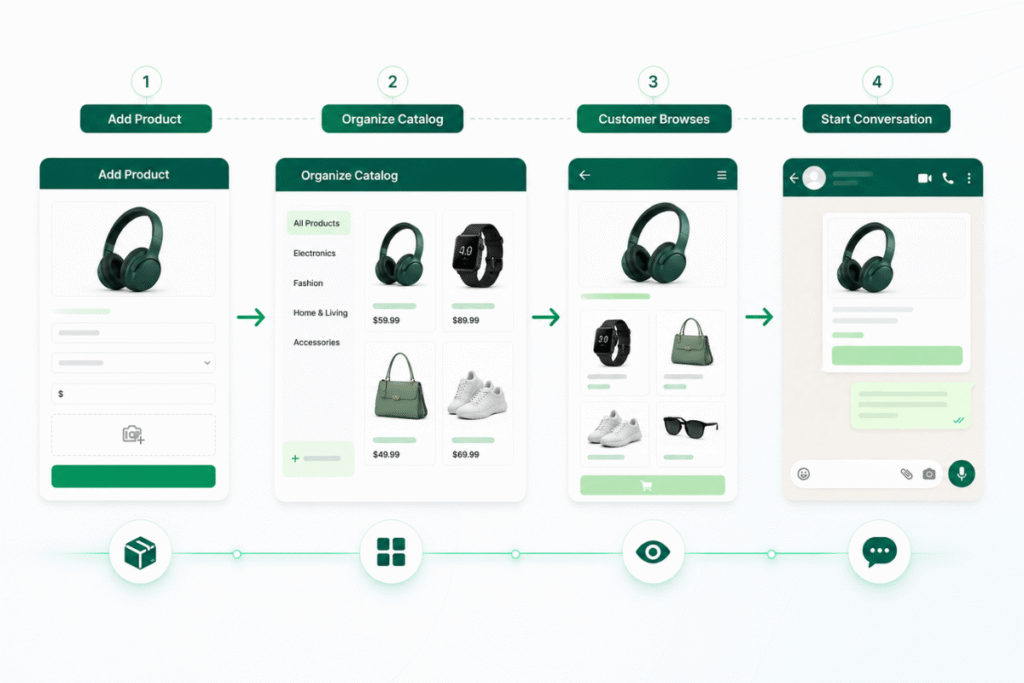
How a Well-Organized Catalog Supports Better Customer Conversations
A WhatsApp Product Catalog does not replace customer communication. Instead, it can make conversations more useful.
When basic information is already available in the catalog, customers can ask more specific questions. For example, instead of asking what products are available, they may ask about a particular size, color, or feature.
This means your team can spend less time repeating the same product information and more time helping customers with genuine questions.
For businesses handling many WhatsApp inquiries, this can create a more efficient communication process.
Tips to Make Your WhatsApp Product Catalog More User-Friendly
A user-friendly catalog should make product discovery simple. Before finalizing your catalog, ask yourself a few questions.
Can customers understand what each product is from the image and name?
Are important details easy to find?
Are similar products grouped together?
Are the prices and product descriptions updated?
Can a customer quickly find what they are looking for?
If the answer to these questions is yes, your catalog is likely easier for customers to use.
You should also think about the mobile experience. Most customers will browse your catalog on a phone, so product images and descriptions should remain easy to understand on a smaller screen.
Using Your Catalog as Part of Your Sales Process
Your WhatsApp Product Catalog can become a useful part of your daily customer communication.
For example, when a new customer contacts your business, you can guide them toward relevant products. When someone asks about a specific category, you can share the related catalog items.
You can also use your catalog when:
- Answering product inquiries
- Sharing new arrivals
- Discussing available options
- Helping customers compare products
- Responding to repeat customers
- Promoting seasonal collections
The main idea is to make product discovery easier without overwhelming customers with too many messages.
Final Thoughts
Learning how to set up a WhatsApp Product Catalog for your store can help you create a more organized way to showcase products and communicate with customers. Instead of sending product photos and prices manually for every inquiry, you can keep important product information structured in one catalog.
Start by adding clear product images, simple product names, accurate prices, and helpful descriptions. Then organize similar products into collections so customers can browse your store more easily.
As your business grows, remember to keep the catalog updated. Add new products, review existing listings, and remove outdated information when necessary.
A well-managed WhatsApp Product Catalog can make product discovery easier for customers and help your business create smoother, more organized customer conversations.
Frequently Asked Questions
What is a WhatsApp Product Catalog?
A WhatsApp Product Catalog is a feature that allows businesses to display products or services in an organized format inside WhatsApp Business. Product listings can include images, names, prices, descriptions, and other relevant information.
How do I set up a WhatsApp Product Catalog for my store?
Open your WhatsApp Business account, go to the business tools section, access the Catalog option, and add a new item. Upload product images, enter the product details, review the information, and save the listing.
Can I add multiple products to my WhatsApp Catalog?
Yes. You can create multiple product listings and organize related products into collections to make browsing easier for customers.
What information should I add to each product?
A useful product listing should include a clear product image, product name, price, and a helpful description. You can also add other available details relevant to your business.
Why are product collections important?
Collections help organize similar products into groups. This makes it easier for customers to browse categories instead of searching through a long list of unrelated products.
How often should I update my WhatsApp Product Catalog?
You should update your catalog whenever there are changes to products, pricing, availability, or important product information. Regular reviews can help keep the catalog accurate.
Can a WhatsApp Product Catalog help reduce repetitive customer questions?
Yes. When important product details are already available in the catalog, customers may be able to find basic information themselves. This can reduce the need to repeatedly send product photos, names, and prices.
What makes a good WhatsApp Product Catalog?
A good catalog uses clear product images, simple names, accurate information, helpful descriptions, and well-organized collections. It should be easy for customers to browse on a mobile device.
By following the steps in this guide on How to Set Up a WhatsApp Product Catalog for Your Store, you can create a more organized product browsing experience for your customers.