
Most websites can track which pages visitors open, what they click and how long they stay. But this information does not always explain what a visitor actually needs. A person comparing two products may have a different question from someone ready to make a purchase, even if both visit the same page.
Voice AI Personalization gives businesses another way to understand customer intent. It allows visitors to explain what they need in their own words, ask follow-up questions and receive responses based on the conversation. When connected with relevant website data and business systems, voice AI can make product guidance, navigation and customer support more relevant.
In 2026, businesses can use voice AI alongside website analytics, chatbots and customer communication platforms. However, effective personalization depends on more than adding a voice assistant to a website. Businesses need accurate information, useful conversation flows, responsible data practices and a clear way to connect customers with human support.
This guide explains how voice AI personalization works, how it differs from traditional chatbots, where businesses can use it and what to consider before implementation.
What Is Voice AI Personalization?
Voice AI personalization is the use of artificial intelligence and voice technology to provide responses and assistance based on what a person says, the context of their request and the information available to the system.
Instead of asking visitors to search through multiple pages or select from fixed options, a voice-enabled system allows them to explain their requirements naturally.
For example, a visitor on an electronics website might say:
“I need a laptop for video editing, but my budget is limited.”
A basic website search may return laptops containing matching keywords. A voice AI system can process the request, identify the main requirements, ask about the visitor’s budget and explain which available products match those requirements.
The recommendations can become more relevant because the system uses information provided during the conversation rather than relying only on browsing activity.
Voice AI personalization may include:
- Personalized product guidance: Suggesting products based on customer requirements.
- Conversational website assistance: Answering questions through spoken interactions.
- Context-aware responses: Using relevant information from the current session or permitted customer records.
- Voice-enabled navigation: Helping visitors reach the right pages or information.
- Customer support: Answering common questions and directing complex issues to human agents.
It is important to distinguish voice AI personalization from ordinary voice search. Voice search mainly helps users find information through spoken queries. Voice AI can also maintain a conversation, interpret follow-up questions and perform supported tasks through connected systems.
Voice AI vs. Traditional Chatbots
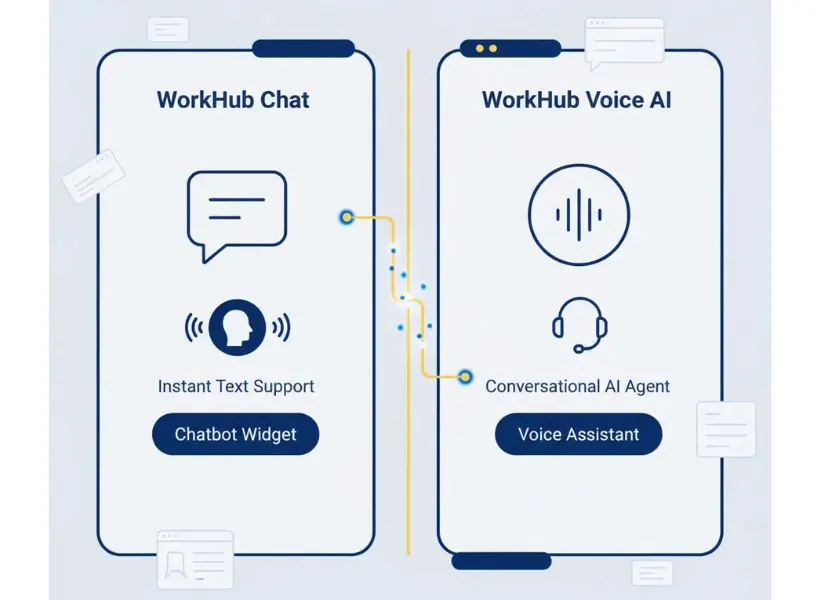
Voice AI and traditional chatbots both help businesses communicate with website visitors, but they use different interaction methods.
Traditional chatbots generally communicate through text. Users type a question and receive a written response, often through predefined conversation flows or AI-generated answers.
Voice AI allows users to speak instead. A voice-enabled AI system processes spoken input, identifies the request and responds through speech. Depending on the platform, it may also display text, links or other visual information.
| Comparison | Voice AI | Traditional Chatbots |
| Interaction | Spoken conversations | Text-based conversations |
| Input | Voice commands and speech | Typed messages and selections |
| Response | Spoken response, sometimes with visual support | Written response |
| User experience | Useful for hands-free or spoken assistance | Convenient for quiet, text-based communication |
| Accessibility | Can support users who prefer speaking | Can support users who prefer reading and typing |
| Accuracy | Depends on speech recognition, language understanding and available data | Depends on message understanding and available data |
| Website navigation | Can guide users through spoken requests | Can provide links and menu-based navigation |
| Best use cases | Voice assistance, spoken enquiries and guided support | FAQs, lead capture, order queries and text support |
Neither option is automatically better for every business. The right choice depends on customer preferences, the type of questions customers ask and the systems the business already uses.
For example, a customer browsing a website in a quiet office may prefer a text chatbot. Someone using a mobile device while carrying out another task may prefer voice interaction.
Businesses can also use both channels, allowing customers to choose how they communicate.
How Voice AI Understands Customer Intent
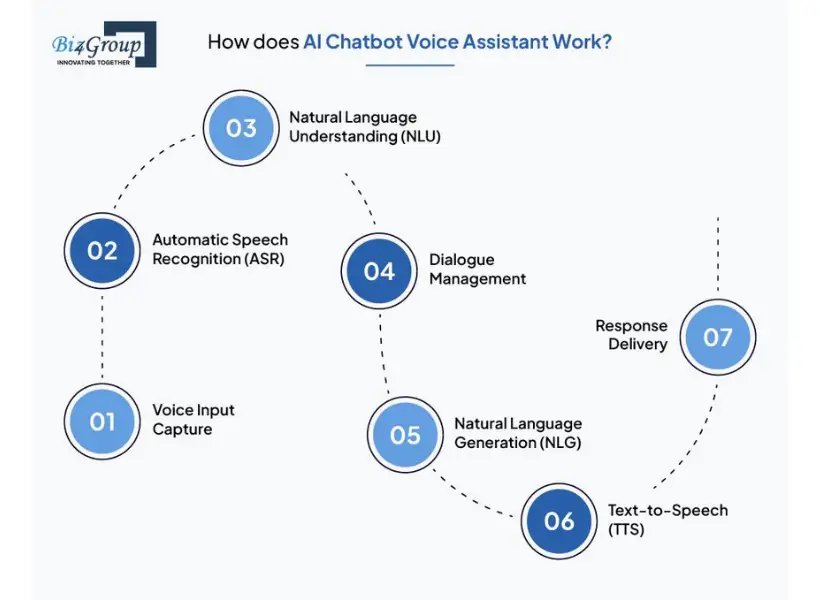
Voice AI uses several connected technologies to process spoken requests and generate relevant responses. Each part has a specific role in the conversation.
1. Automatic Speech Recognition (ASR)
Automatic Speech Recognition converts spoken words into text. It allows the system to process a customer’s question without requiring them to type it.
Recognition quality can vary depending on background noise, pronunciation, accents, speaking speed and the language being used.
2. Natural Language Understanding (NLU)
Natural Language Understanding identifies what the customer means. It extracts important details such as product names, dates, locations, budgets and requested actions.
For example, the request “I need a two-bedroom apartment near the city centre under ₹25,000” contains several requirements that the system can use to narrow its response.
3. Context Management
Context management helps the system understand follow-up questions in the same conversation.
If a customer first asks about a product and then says, “Does it come in black?”, the system should understand that “it” refers to the product discussed earlier.
4. Response Generation
After identifying the request, the system prepares a response using its language model, business knowledge base and connected information sources.
The response should be relevant to the question and should not invent prices, product availability, policies or other business information.
5. Text-to-Speech (TTS)
Text-to-Speech converts the generated response into spoken audio. Voice quality, pronunciation, speaking speed and language support all affect the customer experience.
These technologies work together to create a voice-based interaction. However, the quality of the result also depends on the information available to the AI and the rules defined by the business.
How Voice AI Personalizes the Website Experience for Businesses
Voice AI can make website interactions more relevant by responding to customer requirements during a session. Instead of giving every visitor the same guidance, businesses can use conversation context to adjust the information and assistance they provide.
Here are five practical ways to use voice AI personalization.
1. Real-Time Customer Intent Analysis
Website analytics show what visitors do, such as opening a product page, viewing pricing or clicking a contact button. Voice conversations can provide additional information about why they are taking those actions.
For example, a visitor may open a software pricing page and ask:
“Which plan is suitable for a company with five employees?”
The voice AI system can identify the company size and the visitor’s interest in plan selection. It can then explain the relevant options using the available pricing information.
A different visitor might ask about data security or integrations. The system can provide information related to those requirements instead of repeating the same general product introduction.
Businesses can use these conversations to understand:
- Which products or services customers ask about most often.
- What questions prevent visitors from making decisions.
- Which features customers consider important.
- Where visitors need additional explanation.
- When a request requires assistance from a human representative.
This information can also help businesses improve website content, product pages and customer support resources.
2. Personalized Product Recommendations
A standard product recommendation system may use browsing history, previous purchases or popular products. Voice AI adds another source of information: the customer’s stated requirements.
Consider an online furniture store. A visitor may say:
“I need a compact dining table for a family of four, but my room is small.”
The system can use the stated requirements to identify relevant product options. It may ask about the available room dimensions, preferred material or budget before presenting suitable choices.
Personalized product recommendations can be based on:
- Customer budget and product requirements.
- Preferred size, colour or material.
- Intended use of the product.
- Available inventory and product specifications.
- Previous interactions, where the customer has permitted their use.
The system should use verified product information and current inventory data when making recommendations. If the information is unavailable, it should ask the customer or direct them to a representative rather than presenting an unsupported answer.
This approach can reduce the effort customers spend comparing products and help them make more informed decisions.
3. Context-Aware Customer Conversations
Customers do not always provide all their requirements in the first message. They may ask several questions before explaining exactly what they need.
Context-aware voice AI can use the information already shared in a conversation to make later responses more relevant.
For example:
A customer asks about a business software subscription. The system explains the available plans. The customer then asks whether the software supports multiple users.
Instead of treating the second question as an unrelated request, the system connects it to the subscription discussion and explains the relevant user limits.
Context can include:
- The current website page or product being discussed.
- Information shared during the conversation.
- Previous questions in the same session.
- Customer preferences available through permitted integrations.
- Relevant order or account information, after appropriate authentication.
This can make conversations easier to follow and reduce repeated questions.
However, personalization should use only information that is relevant to the request. Businesses should not assume sensitive details about a visitor or use personal information without an appropriate legal basis and clear privacy practices.
4. Voice-Based Website Navigation and Search
Some websites contain many product categories, service pages, help articles and pricing options. Visitors may struggle to find the correct information, particularly when they are unfamiliar with the website structure.
Voice AI can provide another way to navigate these pages.
For example, a visitor might say:
“Show me your WhatsApp automation plans.”
The system can identify the requested topic and direct the visitor to the relevant pricing or service page.
Other examples include:
- “Where can I read about your API integration?”
- “Show me the delivery information.”
- “I want to compare the available subscription plans.”
- “How can I contact customer support?”
- “Where can I find the product return policy?”
Voice-based navigation is particularly useful when customers know what they want but do not know which menu or page contains the information.
For reliable results, the system needs access to an accurate website content source, working links and clear navigation rules. It should not send visitors to unrelated pages simply because a keyword appears in the page title.
5. Personalized Support and Follow-Ups
Voice AI can answer common questions, guide customers through supported processes and identify when a conversation needs human attention.
For example, a customer contacting a travel company may ask about a booking, cancellation policy or available services. The voice assistant can answer general questions using approved information and route account-specific requests through the appropriate secure process.
After an interaction, a connected system may also support a relevant follow-up. For example, a customer who requests a product quotation could receive the quotation through an approved communication channel if the business has the required customer details and permission.
A useful follow-up process should:
- Reflect the customer’s actual request.
- Use accurate product, service or order information.
- Follow the customer’s communication preferences.
- Avoid sending unnecessary promotional messages.
- Provide a way to reach a human representative.
Voice AI should not be treated as a replacement for every support interaction. Billing disputes, complaints, complex technical issues and sensitive account requests may require trained human agents.
The Technology Behind Voice AI Personalization
Voice AI personalization depends on several technologies working together. Understanding these components helps businesses evaluate platforms and estimate the work involved in implementation.
| Technology | Purpose |
| Automatic Speech Recognition | Converts spoken language into text |
| Natural Language Understanding | Identifies intent, entities and context |
| Large Language Models | Helps generate conversational responses |
| Text-to-Speech | Converts written responses into audio |
| Customer Data Platform or CRM | Provides permitted customer and interaction information |
| Knowledge Base | Supplies approved business information |
| API Integrations | Connects the voice system with business applications |
| Analytics | Measures conversation quality and business outcomes |
For example, a voice assistant on an eCommerce website may need access to product details, inventory, delivery information and order status.
Without these connections, it may answer general questions but cannot reliably provide live order or stock information.
The quality of the knowledge base also matters. Outdated pricing, incomplete product details and conflicting support documents can lead to incorrect answers even when the speech recognition works correctly.
Businesses should therefore review both the AI technology and the information sources it uses.
How to Build a Voice AI Personalization Strategy
A successful voice AI implementation requires clear business objectives, accurate information and testing with real users. The following steps provide a practical approach.
Step 1: Identify Customer Needs and Use Cases
Before selecting a platform, identify where customers need help and whether voice interaction would make that process easier.
Review customer support conversations, website analytics, sales enquiries and frequently asked questions.
Common voice AI use cases include:
- Product selection and comparison.
- Service and pricing enquiries.
- Website navigation.
- Appointment or booking assistance.
- Basic troubleshooting.
- Frequently asked questions.
- Lead qualification.
Prioritize use cases based on customer demand, business value and implementation effort.
For example, a company receiving hundreds of similar product enquiries may benefit from a voice assistant that answers approved product questions. A business handling complex technical support may need a human-led process with AI assistance rather than complete automation.
Choose one clearly defined use case for the initial implementation.
Step 2: Organize Customer and Business Data
Voice AI needs reliable information to provide useful responses. Before connecting it to business systems, review the data that the system will use.
Relevant information may include:
- Product and service descriptions.
- Pricing and plan details.
- Frequently asked questions.
- Delivery and return policies.
- Customer support documentation.
- CRM records and interaction history.
- Inventory or booking information.
Remove outdated documents and resolve conflicting information. Make sure the AI can distinguish between publicly available information and private customer records.
If customer data is used for personalization, define which information can be accessed, why it is needed and how long it should be retained.
A well-organized knowledge base helps reduce unsupported answers and makes ongoing maintenance easier.
Step 3: Select a Suitable Voice AI Platform
The right platform depends on the business’s requirements, technical resources, supported languages and expected conversation volume.
Some businesses may use cloud-based speech services and build custom voice experiences. Others may prefer a platform that provides ready-made conversational workflows and integrations.
Evaluate platforms using the following criteria:
- Speech recognition: Can it understand the languages and accents used by your customers?
- Language understanding: Can it handle follow-up questions and different ways of expressing the same request?
- Response quality: Does it use verified business information?
- Integration options: Can it connect with your CRM, website, booking system or product database?
- Privacy and security: Does it provide suitable controls for voice recordings and customer information?
- Human handoff: Can customers reach a representative when the AI cannot resolve a request?
- Pricing: Are charges based on usage, subscriptions, minutes or other factors?
- Analytics: Can the business review failed conversations and customer outcomes?
Test the platform with actual customer questions before making a long-term decision.
Step 4: Create Conversation Flows
A voice assistant should have a clear purpose for every conversation. Without defined flows, it may ask unnecessary questions or provide information that does not help the customer.
Create conversation paths for the main use cases.
For example, a product enquiry flow could follow this sequence:
- Welcome the visitor and identify the purpose of the request.
- Ask which product category they need.
- Collect relevant requirements such as budget or intended use.
- Retrieve matching product information.
- Explain suitable options.
- Ask whether the visitor needs more information or human assistance.
Define what the assistant should do when it does not understand a request. It can ask the visitor to repeat or rephrase the question, offer a text-based alternative or transfer the conversation to a human agent.
Keep conversations focused. Asking several questions that are not necessary for the customer’s request can make the experience frustrating.
Step 5: Connect Voice AI with Business Systems
Integrations allow voice AI to provide information and complete supported tasks using business applications.
Depending on the use case, the system may connect with:
- CRM software: To access permitted customer records and save interaction details.
- Product databases: To retrieve product specifications, prices and availability.
- Booking systems: To check appointment or reservation information.
- Helpdesk software: To create support tickets and route unresolved requests.
- Analytics platforms: To measure conversation performance.
- Marketing automation tools: To support permitted and relevant follow-up communication.
For example, a customer asking about an order should receive information from the connected order system rather than a response generated from outdated website content.
Sensitive actions such as changing account details or accessing private records should require suitable authentication and authorization.
Step 6: Test Performance and Improve Responses
A voice AI system should be tested with different customer questions, speaking styles, languages and real-world conditions before it is made widely available.
During testing, review:
- Speech recognition errors.
- Incorrect or incomplete responses.
- Questions the system cannot answer.
- Repeated or unnecessary questions.
- Conversation completion rates.
- Human handoff performance.
- Customer feedback.
- Time taken to resolve common enquiries.
Test difficult situations as well as simple questions. For example, check how the assistant responds when a customer changes their requirements, asks an unrelated question or provides incomplete information.
Use the results to improve the knowledge base, conversation flows and integration rules.
Expand the system gradually after it performs reliably for the initial use case.
How Businesses Across Industries Use Voice AI Personalization
Voice AI can support different customer journeys depending on the type of business and the information customers need.
| Industry | Example Voice AI Use Case | How Personalization Helps |
| eCommerce | Product search and recommendations | Matches products to budget, size and customer requirements |
| Healthcare | General appointment and service information | Guides visitors to relevant services while keeping sensitive information protected |
| Banking and Finance | General account service guidance | Directs customers to relevant information and secure support channels |
| Education | Course and admission enquiries | Explains courses based on a student’s stated interests and requirements |
| Travel and Hospitality | Hotel, booking and destination enquiries | Helps visitors compare options based on dates, preferences and budget |
| Real Estate | Property search assistance | Filters property information based on location, size and budget |
| SaaS and Technology | Product and feature guidance | Explains software features based on business requirements |
| Automotive | Vehicle and service enquiries | Helps customers compare models or find relevant service information |
These are examples of possible implementations, not guaranteed outcomes. The available features depend on the selected voice AI platform, connected systems and business processes.
For industries that handle sensitive information, businesses should apply appropriate authentication, data minimization and privacy controls before enabling personalized interactions.
Best Practices for Implementing Voice AI Personalization
The usefulness of voice AI depends on how well it understands customers and how responsibly the business manages the interaction.
1. Use Natural Conversation Language
People do not always speak in complete sentences or follow a fixed sequence of questions. The voice assistant should handle everyday language, short responses and reasonable follow-up questions.
Avoid overly formal scripts that make simple interactions difficult.
2. Keep Responses Relevant and Concise
A customer asking about delivery charges does not need a complete explanation of the company’s history.
Answer the question directly and provide additional information only when it helps the customer.
3. Use Verified Business Information
Connect the system to accurate product details, service information and approved support documents.
Set clear rules for situations where information is missing. The assistant should acknowledge that it cannot confirm an answer rather than inventing one.
4. Give Customers Control
Tell visitors when they are interacting with an AI assistant. Provide clear options to stop the interaction, switch to text or request human support.
Do not make voice interaction the only way to access essential information.
5. Protect Voice and Customer Data
Voice recordings and transcripts may contain personal information. Explain what information is collected, why it is needed and how it is used.
Obtain the required permissions, apply appropriate access controls and provide suitable options for data retention and deletion.
Avoid collecting sensitive information unless it is necessary for the service and handled through an appropriate secure process.
6. Support Different Languages and Accents
A voice assistant that performs well in one language may not perform equally well in another.
Test the languages and accents commonly used by your customers. Provide an alternative communication method when speech recognition does not work reliably.
7. Make Human Handoff Easy
AI should not keep repeating the same response when a customer needs help with a complex issue.
Define clear handoff conditions for complaints, payment problems, technical issues and requests the system cannot resolve.
Pass relevant conversation details to the human representative where appropriate, so the customer does not need to explain the entire issue again.
8. Review Conversations and Improve the System
Monitor failed requests, customer feedback and common misunderstandings.
Update the knowledge base when products, prices, policies or services change. Review conversation performance regularly and test updates before applying them to all users.
How WatConnect Supports Personalized Customer Communication
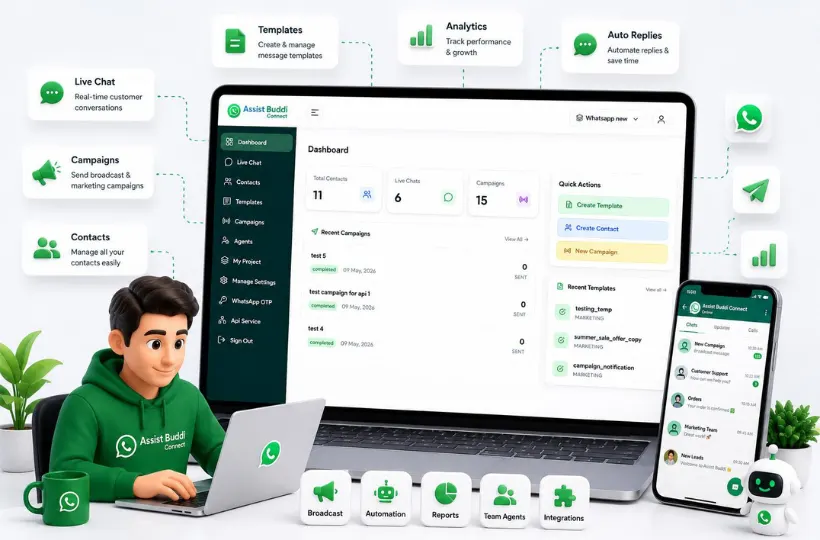
Voice AI can help businesses understand spoken customer requests on websites and supported voice channels. However, many customer interactions continue after the initial enquiry. Businesses also need a way to answer questions, share information and manage follow-ups through the communication channels their customers already use.
This is where WhatsApp-based customer communication can complement a voice AI strategy.
WatConnect is a WhatsApp marketing and automation platform, not a website voice AI agent. It helps businesses manage customer conversations and automate communication through WhatsApp.
Businesses can use WatConnect for several related activities:
WhatsApp Chatbot Automation
The WhatsApp chatbot automation capabilities help businesses handle common customer questions and create automated conversation workflows. These workflows can support enquiries, lead qualification and routine customer assistance.
Shared Customer Conversation Management
The team inbox and conversation management features help teams manage customer chats from a shared workspace. Conversations can be assigned to team members, making it easier to coordinate replies and manage incoming enquiries.
Automated Customer Notifications
With automated WhatsApp notifications, businesses can send relevant updates for supported customer actions and workflows. This can include transactional messages and other approved notifications.
WhatsApp Template Management
The WhatsApp message template management feature helps businesses manage message templates used for approved business-initiated communication.
WhatsApp API Integration
Through WhatsApp API integration, businesses can connect supported systems, synchronize contact information and trigger communication workflows.
For example, a business could use a separate voice AI solution to answer website enquiries and use WatConnect to manage relevant WhatsApp conversations or follow-up messages, subject to customer permission and the applicable WhatsApp messaging rules.
The two systems serve different purposes. Voice AI handles spoken interactions, while WatConnect supports WhatsApp-based messaging, chatbot workflows and team communication.
Businesses should select tools based on the communication tasks they need to manage rather than assuming that one platform provides every voice and messaging feature.
FAQs
1. What is Voice AI Personalization?
Voice AI personalization uses artificial intelligence to understand spoken customer requests and provide responses based on the conversation, customer requirements and relevant available information. Businesses can use it for product guidance, website navigation and customer support.
2. How does Voice AI personalize a website experience?
Voice AI can use spoken questions and conversation context to provide relevant information, recommend suitable products, guide visitors to specific pages and answer common enquiries. The available personalization depends on the platform and its access to business data.
3. What is the difference between Voice AI and voice search?
Voice search converts a spoken query into a search request and returns relevant results. Voice AI can support longer conversations, understand follow-up questions and perform supported tasks through connected systems.
4. Is Voice AI better than a traditional chatbot?
Not in every situation. Voice AI is useful when customers prefer spoken interaction, while traditional chatbots are suitable for text-based enquiries, forms, links and written support. Businesses should choose based on customer preferences and the type of service they provide.
5. Can Voice AI recommend products to customers?
Yes. A voice AI system can recommend products using customer requirements such as budget, size, features and intended use. Reliable recommendations require accurate product information and, where needed, access to current inventory data.
6. Can Voice AI understand different languages and accents?
Many voice AI platforms support multiple languages and accents, but recognition quality varies. Businesses should test the platform with the languages, pronunciation patterns and speaking conditions common among their customers.
7. Is Voice AI personalization safe for customer data?
It can be implemented with appropriate privacy and security controls. Businesses should explain how voice data is collected and used, obtain required permissions, restrict access and follow applicable data protection requirements.
8. Can Voice AI work with CRM and other business tools?
Yes. Depending on the platform, APIs and available integrations, voice AI can connect with CRM systems, product databases, booking platforms, helpdesks and analytics tools. These connections allow the system to retrieve relevant information and perform supported tasks.
9. Can businesses use Voice AI and WhatsApp automation together?
Yes. A separate voice AI solution can handle spoken website interactions, while a WhatsApp automation platform can manage messaging, customer enquiries and follow-up workflows. The systems need suitable integrations and customer permission for the communication being sent.
10. Does WatConnect provide website Voice AI agents?
WatConnect focuses on WhatsApp marketing, chatbot automation, customer messaging, shared conversation management, notifications and API integration. It should not be considered a website voice AI agent platform. Businesses can use it alongside a separate voice AI solution when their communication workflows require both channels.
Conclusion
Voice AI personalization gives businesses another way to understand customer requirements and make website interactions more relevant. Instead of relying only on clicks and browsing history, businesses can use spoken conversations to identify customer questions, provide product guidance and direct visitors to useful information.
However, a good voice experience requires accurate business data, well-designed conversation flows, reliable integrations and clear privacy practices. It also needs an easy way for customers to reach human support when the AI cannot resolve their request.
Voice AI and WhatsApp automation can work alongside each other as part of a wider customer communication strategy. Businesses can use voice technology for spoken interactions and platforms such as WatConnect for WhatsApp messaging, chatbot workflows and team conversation management.