Businesses use artificial intelligence for customer support, sales, marketing and daily operations. However, not every AI tool works in the same way. Some tools answer questions, while others can understand a goal, decide which steps are needed, use connected tools and complete tasks with limited human involvement.
These systems are known as AI agents.
An AI agent can do more than generate a response. Depending on its design and permissions, it can retrieve information, interact with business applications, follow a multi-step process and take action based on a user’s request.
For businesses, AI agents can support customer service, lead qualification, data processing, appointment management and other repetitive workflows. Their actual capabilities depend on the AI model, available tools, business data and rules defined by the organization.
This beginner-friendly guide explains what an AI agent is, how AI agents work, the different types, their benefits, common business applications and how they differ from traditional AI chatbots.
Introduction
Traditional automation follows instructions that developers or businesses define in advance. A basic chatbot may answer a frequently asked question, while a workflow automation tool may send a notification when a customer places an order.
An AI agent can combine several capabilities to handle a broader task. It can interpret a request, decide what information is needed, call an available tool and check whether the task has been completed.
For example, a customer may ask an AI agent to check an order. Depending on its integrations and permissions, the agent can retrieve the order details from a connected system, identify its current status and provide an update.
This does not mean every AI chatbot is an AI agent or that every agent can perform every task independently. The level of autonomy depends on its design, tools, access permissions and human oversight.
Understanding these differences helps businesses select the right AI solution for their requirements.
What Is an AI Agent?
An AI agent is a software system that uses artificial intelligence to understand information, work toward a defined goal, make decisions and take actions using available tools or connected systems.
Unlike a basic chatbot that mainly responds to user messages, an AI agent can handle multiple steps required to complete a task.
For example, consider a customer who wants to schedule a service appointment.
An AI agent connected to a booking system may:
- Understand the customer’s appointment request.
- Ask for the required date and service details.
- Check available appointment slots.
- Present suitable options.
- Book the selected slot after receiving the required confirmation.
- Send an appointment notification through an approved channel.
The agent performs these steps using its instructions, reasoning capabilities and connected tools. It should not claim that an appointment is booked unless the booking system confirms the action.
Common capabilities of AI agents include:
- Understanding requests: Processing natural-language instructions and identifying what a user wants.
- Planning tasks: Dividing a larger request into smaller steps.
- Using tools: Connecting with APIs, databases, calendars and business applications.
- Maintaining context: Using relevant information from the current task or permitted stored records.
- Taking actions: Completing supported operations through connected systems.
- Checking results: Reviewing tool responses and determining whether the requested task was completed.
In simple terms, an AI agent is not limited to answering a question. It can also work through the steps needed to achieve a specific result, provided it has the required access and permissions.
The Evolution: From Rule-Based Chatbots to AI Agents
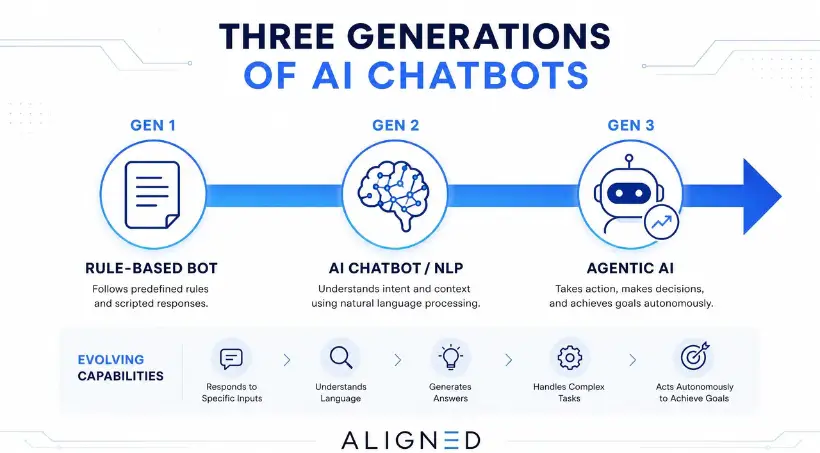
AI-powered customer communication has developed through several approaches. Each approach offers different levels of flexibility and task-handling capability.
1. Rule-Based Chatbots
Rule-based chatbots operate using predefined instructions, decision trees and conversation flows.
For example, a customer support chatbot may display these options:
- Order status
- Payment information
- Delivery details
- Contact support
When a customer selects an option, the chatbot follows the corresponding path.
These chatbots are useful for predictable enquiries and structured conversations. However, they may struggle when users ask questions outside the available flow or phrase requests in unexpected ways.
2. AI-Powered Chatbots
AI-powered chatbots use natural language processing or language models to understand a wider range of customer messages.
Instead of requiring an exact keyword or menu selection, they can interpret questions written in different ways.
For example:
- “What are your working hours?”
- “When does your office close?”
- “Can I contact you after 6 PM?”
An AI chatbot connected to an accurate business knowledge base may understand that all three questions relate to business hours.
These chatbots can provide more flexible conversations, but answering a question does not automatically mean the system can perform an external action.
3. AI Agents
AI agents can combine language understanding with reasoning, planning and tool usage.
For example, a customer asking to reschedule an appointment may need more than an explanation of the booking policy.
A connected AI agent could check the existing appointment, retrieve alternative slots, ask the customer to select one and update the booking after receiving the necessary confirmation.
The main difference is the ability to move from understanding a request to executing a sequence of supported actions.
| Technology | Main Function | Example |
| Rule-based chatbot | Follows predefined conversation paths | Displays order-related menu options |
| AI-powered chatbot | Understands questions and generates responses | Answers questions about delivery policies |
| AI agent | Plans and performs supported multi-step tasks | Checks an order and requests an eligible delivery update |
These technologies are not necessarily separate products. A modern business system may combine rule-based workflows, AI chatbots and agent capabilities depending on the task.
How Do AI Agents Work?
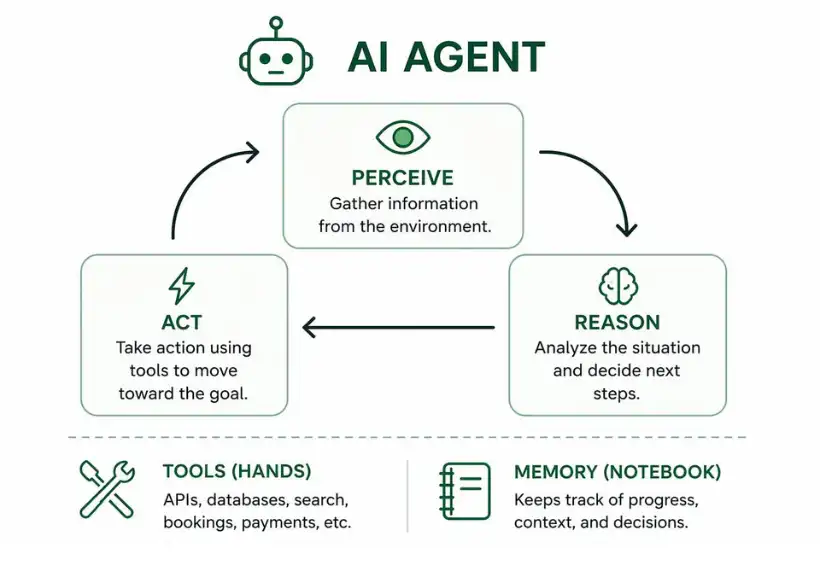
AI agents use several connected components to understand requests and complete tasks. Their architecture may differ depending on the application, but most tool-using agents follow a process involving input, reasoning, tools, memory and action.
1. Input and Perception
The agent first receives information from a user or an external system.
Inputs may include:
- Text messages
- Voice commands
- Uploaded documents
- Website activity
- Database information
- System notifications or events
The agent processes the available input to identify the request and relevant details.
For example, if a customer says, “Please check my order placed yesterday,” the system needs to identify that the user is asking for order information and determine which details are required to locate the correct record.
2. Reasoning and Planning
After understanding the request, the agent determines what steps are needed to achieve the goal.
A request involving several actions may require the agent to create a sequence of tasks.
For example, a sales-related AI agent may need to:
- Identify the customer’s product requirements.
- Check the available product information.
- Compare suitable options.
- Prepare a response based on the comparison.
- Record the enquiry in a connected CRM.
The reasoning component helps select the next action based on the request, instructions and information available.
However, AI reasoning is not always correct. Businesses should define limits, validation rules and approval requirements for important actions.
3. Tools and External Integrations
Tools allow an AI agent to interact with systems outside its language model.
These tools may include:
- CRM software
- Databases
- Calendar applications
- Payment systems
- Inventory platforms
- Customer support software
- Business APIs
For example, an AI agent cannot reliably confirm live product availability using only general language-model knowledge. It needs access to an inventory system or another verified information source.
Similarly, an agent that needs to schedule a meeting must have access to an appropriate calendar or booking tool.
The tools and permissions determine what the agent can actually do.
4. Memory and Context
Memory helps an AI agent retain relevant information during a task or across permitted interactions.
There are two common forms:
Short-Term Memory
Short-term memory stores information needed during the current conversation or task.
For example, if a customer shares a preferred appointment date and then asks about available times, the agent can use the date already provided.
Long-Term Memory
Long-term memory stores selected information that may be useful across future interactions, depending on the system’s design and data-retention rules.
This may include permitted customer preferences, previous task information or relevant records.
Memory should not be confused with automatic learning. An agent may retain conversation context without changing its underlying model or improving its behaviour automatically.
5. Action and Feedback
Once the agent has selected an appropriate action, it uses an available tool to perform it.
The system then checks the result returned by that tool.
For example:
- The agent requests an order status.
- The connected order system returns the current status.
- The agent checks the returned information.
- It explains the result to the customer.
If the action fails, the agent may retry within defined limits, request missing information or transfer the task to a human representative.
This feedback process helps the agent determine whether the task was completed or whether another step is required.
Types of AI Agents
AI agents can be classified according to how they make decisions and interact with their environment. Some classifications come from traditional AI research, while modern systems also use large language models and external tools.
1. Simple Reflex Agents
Simple reflex agents respond to the current input using predefined condition-action rules.
For example, a system may detect a specific event and trigger an automatic response.
Common characteristics:
- Follow predefined rules.
- Respond to current inputs.
- Do not require complex planning.
- Work well in predictable situations.
These agents are suitable for simple tasks where the possible conditions and responses are clearly defined.
2. Model-Based Agents
Model-based agents maintain an internal representation of their environment. This helps them make decisions using current information and relevant previous states.
For example, an automated inventory system may consider current stock levels and pending orders before deciding whether a product needs replenishment.
Common characteristics:
- Maintain information about the current state.
- Consider relevant previous information.
- Handle situations where not all information is visible.
- Make decisions using an internal model.
3. Goal-Based Agents
Goal-based agents select actions according to a defined objective.
For example, a scheduling agent may need to find an appointment time that matches a customer’s preferred date and the service team’s availability.
It evaluates possible actions and selects one that helps achieve the requested result.
Common characteristics:
- Work toward a specific goal.
- Consider different possible actions.
- Plan multiple steps when required.
- Adjust the plan when conditions change.
4. Utility-Based Agents
Utility-based agents compare possible outcomes using defined preferences or evaluation criteria.
For example, a delivery planning agent may compare routes based on estimated travel time, delivery cost and service constraints.
It selects an option that provides the best overall result according to the criteria it has been given.
Common characteristics:
- Compare different possible outcomes.
- Use defined preferences or scoring criteria.
- Balance competing requirements.
- Select actions based on expected usefulness.
5. Learning Agents
Learning agents use feedback or experience to modify aspects of their behaviour.
For example, a recommendation system may use feedback about previous suggestions to improve future recommendations.
Common characteristics:
- Use feedback or training data.
- Adjust behaviour through learning mechanisms.
- Identify patterns in available information.
- Improve performance when the learning process is properly designed.
Not every AI agent learns automatically from conversations. Learning may require separate training, evaluation, feedback pipelines or model updates.
6. LLM-Powered AI Agents
LLM-powered AI agents use large language models to interpret instructions, generate plans and interact with connected tools.
They are commonly used for tasks involving natural-language communication and multiple steps.
For example, an LLM-powered business agent may receive a request to prepare a customer report, retrieve information from a CRM, organize the data and create a summary.
Common characteristics:
- Understand natural-language instructions.
- Handle different ways of expressing a request.
- Use connected APIs and tools.
- Support multi-step workflows.
- Maintain relevant task context.
These agents can also be combined with traditional rules and workflow automation to improve control and reliability.
Benefits of AI Agents
AI agents can help businesses handle tasks that involve repeated decisions, information retrieval and interactions with multiple systems. Their benefits depend on the quality of implementation and the tasks assigned to them.
1. Automated Task Execution
AI agents can perform supported tasks through connected business tools.
For example, an agent may retrieve customer information, create a support ticket or update a CRM record when the required permissions and integrations are available.
This reduces the need for employees to complete every individual step manually.
2. Faster Customer Responses
AI agents can process requests and retrieve information without requiring a human employee to respond to every routine enquiry.
A customer asking about a delivery status, appointment or product specification may receive an answer from a connected information source.
Complex questions and sensitive requests should still be transferred to the appropriate team.
3. Reduced Repetitive Work
Employees often spend time on recurring activities such as data entry, information lookup, report preparation and routine customer updates.
AI agents can handle some of these activities through approved workflows.
This allows employees to spend more time on tasks that require judgement, communication and specialist knowledge.
4. Handling Multiple Workflow Steps
A basic automation rule usually performs a predefined action when a particular condition is met.
An AI agent can handle a more flexible sequence of steps when the task requires interpretation and decisions.
For example, an agent may collect customer requirements, check a connected database, compare available options and prepare a response.
The system still needs clear boundaries for actions that require human approval.
5. Context-Based Assistance
AI agents can use relevant information from the current task and connected business systems to provide more appropriate responses.
For example, an agent handling a support request may use the product name, issue description and relevant support documentation to identify the correct troubleshooting instructions.
This can reduce repeated questions and make customer interactions easier to manage.
Common AI Agent Use Cases
AI agents can be used across different business functions. The exact applications depend on the industry, connected systems and level of automation required.
1. Sales and Lead Qualification
Sales agents can collect information from potential customers, identify their requirements and organize lead details.
For example, an AI sales agent may ask about company size, product requirements and expected purchase timelines before recording the enquiry in a CRM.
2. Customer Support
Customer support agents can answer common questions, retrieve information from approved knowledge sources and create support tickets.
When an issue requires specialist attention, the agent can transfer the request to a human representative.
3. Marketing Operations
AI agents can assist with campaign-related tasks such as organizing information, preparing message drafts, segmenting records and retrieving campaign data.
Any customer-facing marketing communication should follow the relevant platform policies and consent requirements.
4. Internal Business Operations
Businesses can use AI agents to handle selected internal tasks.
Examples include:
- Preparing reports from connected data.
- Organizing meeting information.
- Retrieving documents.
- Updating approved records.
- Sending internal notifications.
- Coordinating tasks across connected applications.
5. Appointment and Booking Management
An AI agent connected to a booking system can check available time slots, collect customer details and submit appointment requests.
The system should confirm a booking only after receiving successful confirmation from the booking platform.
6. eCommerce and Order Management
An eCommerce AI agent may help customers find products, compare specifications, check order information and access return instructions.
For live stock, payment or order information, the agent needs an appropriate connection to the relevant business system.
AI Agents vs. AI Chatbots: What’s the Difference?
AI agents and AI chatbots are related technologies, but they are designed for different levels of task handling.
An AI chatbot primarily focuses on communicating with users and providing information. An AI agent can also use tools, plan steps and perform supported actions to achieve a defined goal.
| Comparison | AI Chatbots | AI Agents |
| Main purpose | Answer questions and manage conversations | Work toward goals and complete tasks |
| Interaction | Usually conversation-based | Conversation, system events or other inputs |
| Decision-making | Often follows predefined flows or generates responses | Can reason and select actions within defined limits |
| Task execution | May trigger simple predefined actions | Can perform multi-step tasks using tools |
| Integrations | May connect with APIs and business systems | Often relies on tools and integrations to act |
| Context | Can maintain conversation context | Can use task state and permitted memory |
| Autonomy | Usually limited to conversation or defined workflows | Can have greater autonomy depending on permissions |
| Example | Answers questions about delivery policies | Checks an order system and provides a verified status |
Can an AI Chatbot Also Be an AI Agent?
Yes. The distinction is not always based on the interface.
A chatbot can act as the communication interface for an AI agent. When it is connected to reasoning capabilities, tools and task-execution workflows, it may perform agent-like functions.
For example, a WhatsApp chatbot that only answers frequently asked questions is primarily a conversational support tool. A connected system that can understand a booking request, check availability, request confirmation and submit the booking may have agent capabilities.
The important factor is what the system can actually do, not whether it is called a chatbot or an AI agent.
What Should Businesses Consider Before Using AI Agents?
AI agents can perform useful tasks, but giving software access to business systems also introduces risks. Businesses should evaluate the following points before deployment.
1. Define the Agent’s Responsibilities
Give the agent a clear objective and define which tasks it can perform.
Avoid giving broad permissions when only limited access is needed.
2. Connect Reliable Data Sources
The agent should use current and verified information from approved business systems.
Outdated product details, incorrect pricing or incomplete customer records can lead to poor decisions.
3. Set Action Permissions
Not every action should be performed without approval.
For example, an agent may retrieve an invoice automatically but should require appropriate authorization before issuing a refund or changing sensitive account information.
4. Protect Customer Information
Use authentication, access controls and appropriate data-retention policies.
Businesses should ensure that the agent can access only the information required for its assigned tasks.
5. Monitor Results
Review completed actions, failed tasks, incorrect responses and customer feedback.
Monitoring helps identify where the agent needs better instructions, improved data or additional human oversight.
6. Provide Human Support
AI agents should have a clear escalation process for complex, sensitive or unresolved requests.
Human employees should be able to review important actions and take control when necessary.
How WatConnect Supports AI-Powered Customer Communication

AI agents can handle complex tasks when connected to the right tools and systems. However, businesses also need practical ways to manage customer enquiries, automate routine communication and coordinate conversations across their teams.
WatConnect is a WhatsApp marketing and automation platform that helps businesses manage customer communication through WhatsApp.
Its capabilities support several customer communication activities:
WhatsApp Chatbot Automation
The WhatsApp chatbot automation platform helps businesses create automated conversation flows for customer enquiries, frequently asked questions and lead qualification.
Businesses can use chatbot workflows to respond to common requests and manage routine customer interactions.
Automated Customer Notifications
With automated WhatsApp notifications, businesses can send relevant updates based on supported events and workflows.
Examples include order updates, form-related notifications and other customer communication.
Shared Team Inbox
The team inbox and customer conversation management capabilities allow teams to manage WhatsApp conversations from a shared workspace.
Businesses can assign chats to team members and coordinate customer responses more efficiently.
WhatsApp Bulk Messaging
The WhatsApp bulk messaging functionality helps businesses send messages to their opted-in audiences using approved WhatsApp message templates and applicable messaging rules.
WhatsApp API Integration
Through WhatsApp API integration, businesses can connect supported applications, synchronize contact information and trigger communication workflows.
How AI Agents and WatConnect Can Work Together
A business may use a separate AI agent to perform tasks through its CRM, booking system or other applications, while WatConnect manages WhatsApp-based customer communication.
For example, a business could connect an external AI agent to its booking system. After a booking is confirmed, an integrated workflow could use WatConnect to send the customer an appropriate WhatsApp notification, subject to the required permissions and messaging rules.
These systems have different roles:
- AI agents can reason, use connected tools and perform assigned tasks.
- WatConnect supports WhatsApp chatbot workflows, customer messaging, team inbox management and communication automation.
WatConnect should not be treated as a general-purpose autonomous AI agent platform. Its role is to support business communication and WhatsApp automation.
Conclusion
AI agents are software systems that can understand requests, work toward defined goals, use connected tools and perform supported actions. Unlike systems that only generate responses, they can handle multiple steps required to complete a task.
Businesses can use AI agents for customer support, sales qualification, booking management, internal operations and other workflows. However, successful implementation requires reliable data, suitable integrations, clear permissions and human oversight.
AI agents and chatbots can also work together. Businesses can use agents for task execution and platforms such as WatConnect to manage WhatsApp customer conversations, chatbot automation and notifications.
The right solution depends on the work that needs to be completed, the systems involved and the level of control the business requires.