
Most websites still depend on users clicking buttons, filling out forms, navigating menus and typing search queries. These methods work, but they are not always convenient. A visitor using a mobile phone, dealing with a visual or motor impairment, or trying to complete a task while their hands are occupied may prefer another way to interact with a website.
Voice-first web experiences provide that option. Instead of relying entirely on clicks and typed commands, users can speak naturally to search for information, ask questions, navigate services or complete supported actions.
Voice technology has developed beyond basic voice search. Modern systems can combine speech recognition, natural language processing, conversational AI and text-to-speech to understand spoken requests and respond with relevant information.
However, adding a microphone button does not automatically make a website voice-first. A useful voice-first experience needs to understand user intent, maintain conversational context, provide clear feedback and allow visitors to switch between voice, text and visual controls.
This guide explains what voice-first web experiences are, how they differ from voice-enabled websites, where businesses can use them, their benefits, the technology behind them and the challenges to consider when planning a voice-first website in 2026.
The Shift from Click to Speak: Why Voice Is Changing Web Interactions
Traditional websites are designed around visual navigation. Visitors read headings, select menu items, open pages, complete forms and use search boxes to find information.
This approach can become inconvenient when users need to complete several steps or cannot easily interact with a screen. For example:
- A customer wants to check a product’s availability without navigating multiple product pages.
- A visitor needs directions or business information while using a mobile device.
- A person with limited motor control finds small buttons and complex forms difficult to use.
- A customer wants to ask a question in their own words rather than search through a help centre.
Voice interaction provides another way to communicate with a website. A visitor could say, “Show me the available plans for a small business,” rather than opening several pages and comparing the information manually.
The website can convert speech into text, identify the request, retrieve relevant information and respond through text, speech or visual results.
The important change is not simply replacing typing with speaking. It is allowing people to express their needs in natural language while the website provides an appropriate response.
Voice-First vs. Voice-Enabled: Understanding the Difference
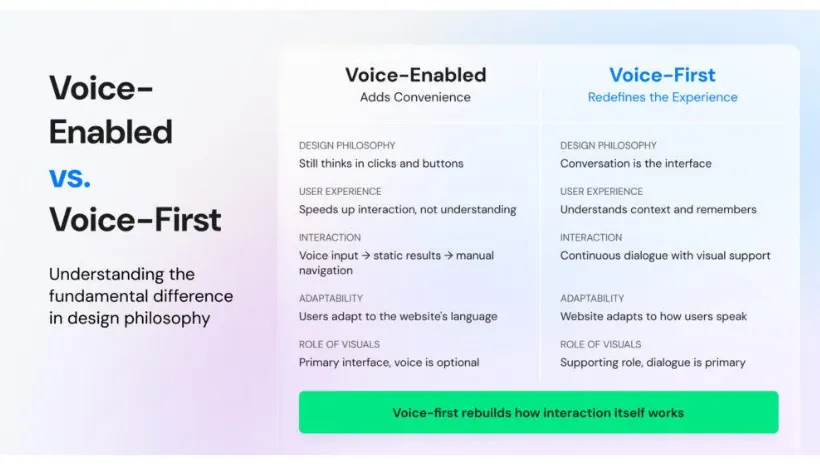
Voice-first and voice-enabled websites both support spoken interaction, but they do not use voice in the same way.
A voice-enabled website adds voice as an additional input method. A voice-first website considers spoken interaction as a central part of the experience and designs its navigation, responses and task flows around conversation.
Voice-Enabled Websites Add Voice as an Extra Feature
A voice-enabled website usually allows visitors to use speech for a specific task, such as searching for a product or entering text into a form.
For example, a visitor can select a microphone icon, say a product name and receive the same search results they would get by typing.
This can save typing time, particularly on mobile devices. However, the rest of the website may still depend on traditional menus, buttons and forms.
Voice input makes one part of the website easier to use, but it does not necessarily change the complete interaction experience.
Voice-First Website Design Makes Conversation a Core Interaction Method
Voice-first website design gives spoken interaction a more central role.
Visitors can ask questions, provide additional details, clarify requests and continue a conversation without repeating the same information unnecessarily.
For example, a user might say:
“I need a customer support solution for a team of ten.”
The system could ask which communication channel the business uses, provide relevant options and explain the next step.
A well-designed experience also displays useful information on the screen. Visitors can review the response, select an option, correct a misunderstanding or switch to text whenever they prefer.
The website does not force every visitor to use voice. It makes voice available as a meaningful alternative to traditional navigation.
Where Voice-First Web Experiences Already Work
Voice-first interaction can support different website functions. Its suitability depends on the task, audience, environment and accuracy requirements.
Here are some practical applications.
E-commerce websites: Customers can ask questions about product specifications, sizes, availability, delivery options and order details. Voice interaction can help visitors narrow down product choices.
Customer support websites: Visitors can describe a problem in their own words and receive relevant troubleshooting instructions or answers to common questions.
Educational platforms: Learners can use spoken questions to find lessons, request explanations or navigate learning resources.
Travel and hospitality websites: Visitors can ask about room availability, booking requirements, check-in times, facilities and location information.
Healthcare information websites: Visitors can use voice input to locate general health information, find departments or navigate appointment-related pages. Medical decisions still require appropriate professional oversight.
Productivity and business tools: Users can dictate notes, create supported tasks, search records or interact with scheduling tools through voice commands.
The most useful applications focus on tasks where speaking reduces unnecessary navigation or makes information easier to access.
Why Voice-First Web Design Matters in 2026
Voice-first web design is becoming a relevant option for businesses because user expectations, browser capabilities and conversational technologies continue to develop.
However, adoption should be based on actual user needs rather than assumptions that every visitor prefers voice.
Voice Interaction Is Already Part of Everyday Technology
People regularly use voice assistants, speech-to-text features, dictation tools and voice search on smartphones and other devices.
These habits have made spoken commands familiar in many situations. Users may expect similar convenience when interacting with a website, particularly when searching for information or completing simple tasks.
Businesses can respond by offering voice as another interaction method where it improves the user journey.
Users Expect More Natural Website Interactions
Traditional website search often requires visitors to understand how information is organised.
For example, a customer looking for a specific service may need to know which category or menu contains the answer.
Conversational interaction allows the visitor to describe the requirement directly. A system that understands the request can guide the person towards relevant content without requiring them to know the website structure.
This is particularly useful for websites with large product catalogues, extensive help centres or multiple service categories.
Mobile Website Usability Requires More Than Smaller Screens
Mobile-first design made websites easier to use on smaller screens. Voice interaction can provide another option for visitors who find typing or navigating mobile interfaces inconvenient.
For example, a visitor could speak a search query instead of using a small keyboard.
Voice should still work alongside touch controls. Some visitors may be in noisy environments, unable to speak privately or simply more comfortable typing.
A mobile website should therefore support different interaction methods rather than depending entirely on voice.
Benefits of Voice-First Web Experiences
A properly implemented voice-first interface can improve accessibility, navigation and customer interaction. The actual results depend on how accurately the system understands requests and how well it supports the tasks visitors need to complete.
Improved Website Accessibility
Voice interaction can make certain website tasks easier for people who have difficulty using a keyboard, mouse or touchscreen.
For example, visitors with some motor disabilities may find spoken input more convenient than selecting small interface elements. People who have difficulty reading long passages may benefit from spoken responses when those responses are available and appropriate.
Voice is not a replacement for accessibility standards or assistive technologies. Websites must continue to provide keyboard navigation, readable content, screen-reader support, captions or transcripts where appropriate, and clear visual controls.
Faster Search and Information Retrieval
Typing a long question into a search box can be inconvenient, especially on a mobile device.
With voice search for websites, visitors can speak a query in their own words. The system can convert the speech into text and use it to retrieve relevant information.
For example, instead of entering “enterprise plan pricing,” a visitor might ask, “How much does your enterprise plan cost for a team of twenty?”
A conversational system can interpret the longer request and provide a more relevant response if the required information is available.
More Natural Customer Communication
Voice interfaces allow visitors to ask questions in a conversational way.
They can provide additional context, correct a previous request or ask a follow-up question without learning a specific command format.
This can be useful for businesses that receive repeated questions about services, pricing, delivery, product details or booking requirements.
Convenient Interaction During Multitasking
There are situations where users cannot comfortably type or navigate a website.
For example, someone may be preparing food, handling a task at work or using a device while their hands are occupied.
Voice interaction can provide an additional way to request information in these situations. It should not be promoted as a substitute for safe driving or other activities that require full attention.
Better Support for Mobile Visitors
Voice input can reduce the amount of typing required on mobile devices.
Visitors can speak a search query, request directions or ask a question without entering a long message through an on-screen keyboard.
For businesses with a large mobile audience, voice interaction may improve access to specific website functions when implemented with suitable text and touch alternatives.
Building Blocks of Voice-First Web Experiences
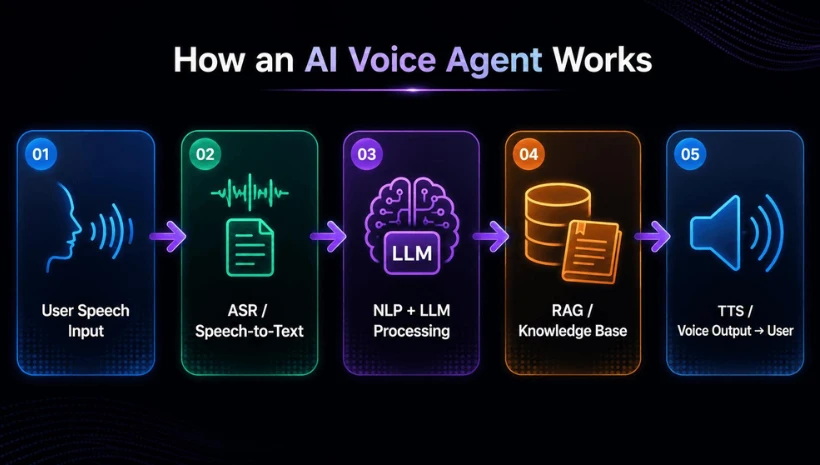
A reliable voice-first website requires more than speech recognition. Several technical and design components work together to understand a request and provide an appropriate response.
Speech Recognition and Conversational Intelligence
Speech recognition converts spoken language into text that a system can process.
The next step is understanding what the visitor means. Natural language processing (NLP) and language models can help identify intent, extract important details and interpret follow-up questions.
For example, a visitor might ask, “Do you have a cheaper option?”
A context-aware system should understand that the visitor is referring to a product or service discussed earlier, rather than treating the sentence as an unrelated search.
Speech recognition and language understanding are separate tasks. Accurate transcription does not guarantee that the system has correctly understood the visitor’s intention.
Contextual and Responsive Conversations
A useful voice interface should maintain relevant context during an interaction.
If a visitor asks about a service and then says, “What does the second option include?”, the system should connect the follow-up question to the options already presented.
It should also recognise when a request is unclear. Instead of guessing, the system can ask a short clarification question.
Conversation history should only be retained when needed and handled according to the website’s privacy and data-retention practices.
Text-to-Speech and Clear Audio Responses
Text-to-speech (TTS) converts written responses into spoken audio.
It allows a website to read out instructions, search results, explanations or other supported content.
Good voice responses should be clear, appropriately paced and easy to understand. Long answers may be difficult to follow when spoken, so the system should summarise important details and provide a visible transcript or full text.
Visitors should be able to pause, replay or disable spoken responses.
Multimodal Integration
Voice-first does not mean voice-only.
Multimodal design combines spoken interaction with visual information and touch controls.
For example, a customer can ask for available products by voice, review product cards on the screen and select one by tapping.
The visual interface can also display:
- A visible microphone status.
- A transcript of the visitor’s spoken request.
- The system’s written response.
- Relevant product images or service details.
- Confirmation before an important action.
This approach helps visitors understand what the system heard and gives them control over the interaction.
AI-Powered Personalization
AI can use relevant conversation context and permitted customer information to make responses more useful.
For example, a website may use a visitor’s selected location to show relevant service areas or use previously selected product preferences to narrow search results.
Personalization should be based on information the business is allowed to use. Visitors should not be surprised by hidden data collection or unclear tracking practices.
The system should also allow users to correct inaccurate information and change their preferences.
Challenges and Considerations in Voice-First Website Design
Voice-first website design introduces technical, privacy and usability requirements. Businesses should address these issues before making voice interaction a central part of the website.
Microphone permissions and privacy: Websites should request microphone access only when the visitor chooses to use voice input. Explain why audio is needed, whether it is processed locally or sent to an external service, and how related data is handled. Provide an obvious way to stop listening.
Speech recognition accuracy: Accents, pronunciation, background noise and language differences can affect transcription quality. Test the system with the languages and user groups it is intended to support.
Browser and device compatibility: Speech recognition support varies across browsers and devices. The Web Speech API includes speech recognition and speech synthesis, but browser support is not uniform. A website should check feature availability and provide a text-based alternative when voice recognition is unavailable. <Cite refs={[“turn365181search0″,”turn365181search1”]}/>
Background noise: Busy offices, public spaces and outdoor environments can make spoken requests difficult to recognise. The interface should allow users to repeat a request, edit the transcript or switch to typing.
User comfort: Not every visitor wants to speak to a website. Some may be in a shared office, public transport or a place where speaking is inconvenient. Voice should remain optional.
Incorrect responses and actions: A system may misunderstand a request or provide an inaccurate answer. Important actions such as submitting a form, making a booking or changing account details should include confirmation and a way to correct mistakes.
Accessibility requirements: Voice interaction must not become the only way to use a website. Provide keyboard access, visible controls, readable text and compatibility with assistive technologies.
Cross-device consistency: A voice interface should behave predictably across supported desktop and mobile browsers. Test microphone permissions, audio playback, interruptions and switching between voice and text.
These considerations help businesses build voice features that are usable, transparent and reliable instead of adding a microphone button without a clear purpose.
How to Build Voice-First Experiences for Your Website
A successful voice-first website begins with a specific user problem. Businesses should identify where voice can make an existing task easier before selecting the technology.
1. Identify Tasks That Benefit from Voice
Review the website’s user journey and identify tasks where typing or navigation creates friction.
Common examples include:
- Searching large product catalogues.
- Finding answers in a help centre.
- Checking service information.
- Navigating educational content.
- Requesting basic booking information.
- Finding contact details and business locations.
Choose one or two suitable tasks for the initial implementation.
2. Select the Right Speech Technology
The technology depends on the level of interaction required.
A basic voice search feature may need speech recognition and a search function. A conversational voice assistant may also require natural language understanding, a response system, text-to-speech and access to relevant business data.
The Web Speech API provides browser interfaces for speech recognition and speech synthesis. More advanced implementations may use cloud speech services or other speech-processing platforms. Check browser support, processing requirements and privacy implications before selecting an approach. <Cite refs={[“turn365181search0″,”turn365181search1″,”turn365181search2”]}/>
3. Prepare Accurate Website Information
A voice system can only provide useful business answers when it has access to reliable information.
Organise relevant content such as:
- Product and service details.
- Pricing and plan information.
- Business hours and contact information.
- Delivery or booking policies.
- Frequently asked questions.
- Support instructions.
Keep this information updated. If the system cannot verify an answer, it should say so instead of generating an unsupported response.
4. Design Conversation Flows
Plan how the system should respond to common requests and follow-up questions.
For example:
Visitor: “I want to know about your services.”
Website: “Which service are you interested in: customer support, marketing or automation?”
Visitor: “Customer support.”
Website: “Are you looking for live support, automated replies or both?”
The system should also handle unclear speech, interruptions, repeated questions and requests that it cannot fulfil.
5. Add Visual Controls and Text Alternatives
Provide a visible microphone button, listening indicator, transcript and written response.
Visitors should be able to edit recognised text, stop recording and switch to a normal search or chat interface.
This keeps the website usable when voice recognition is unavailable or unsuitable for the visitor’s situation.
6. Test with Real Users and Different Devices
Test the experience on supported browsers, mobile devices and desktop computers.
Include different accents, speaking speeds, background noise conditions and common user requests.
Measure practical outcomes such as task completion, recognition errors, unanswered questions, user feedback and the number of visitors who switch to text.
Use these results to improve the experience before adding more voice features.
How WatConnect Supports Customer Communication Through WhatsApp
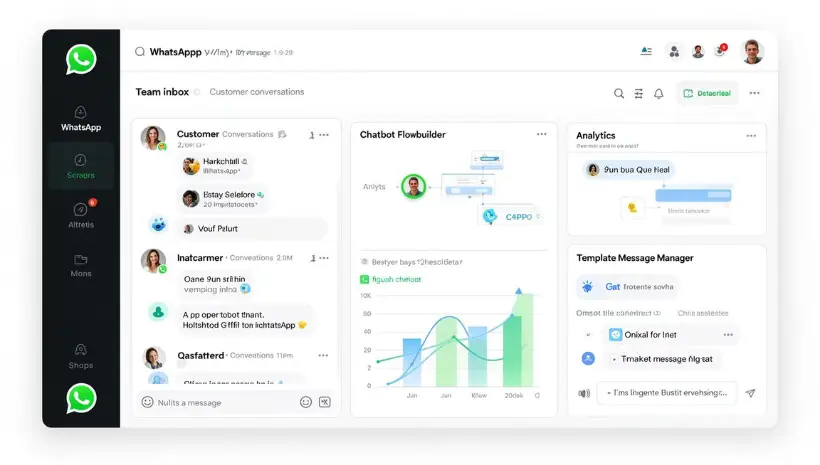
Voice-first website design and WhatsApp customer communication solve different interaction needs. A website voice interface allows visitors to speak to a website, while WhatsApp automation helps businesses manage customer messages and conversations through WhatsApp.
WatConnect focuses on WhatsApp marketing and customer communication. Businesses can use its tools to manage customer enquiries, automate supported conversations and organise messaging workflows.
Automate Customer Enquiries with WhatsApp Chatbots
WatConnect provides WhatsApp chatbot functionality that businesses can use to answer common questions, assist customers and support selected workflows.
For example, a business can use WhatsApp chatbot automation to handle frequently asked questions and guide customers through predefined conversation flows.
Manage Customer Conversations Through a Shared Team Inbox
When multiple employees handle customer enquiries, managing conversations across separate devices can become difficult.
A shared inbox allows team members to manage customer chats from one place and assign conversations to the appropriate staff.
Businesses can use team inbox and customer conversation management to organise WhatsApp support and improve coordination between team members.
Send Automated WhatsApp Notifications
Businesses often need to send order updates, payment information, booking confirmations and other transactional messages.
With automated WhatsApp notifications, businesses can send relevant updates through supported messaging workflows instead of manually sending every notification.
Connect Customer Communication with Business Systems
Businesses may need to connect their messaging workflows with a CRM, eCommerce platform or internal system.
WatConnect supports WhatsApp API integration for syncing contact information, triggering messages and connecting supported business workflows.
These capabilities help businesses manage WhatsApp communication alongside their website experience. They are not a replacement for a dedicated website voice interface, but they can support the next stage of customer communication after a visitor makes an enquiry.
The Road Ahead for Voice-First Web Experiences
Voice-first web experiences provide another way for people to interact with websites. They can make search, navigation and customer support more convenient when spoken interaction suits the task.
In 2026, businesses should focus less on adding voice for its own sake and more on solving specific user problems. Better speech recognition, conversational context, multilingual support and multimodal interfaces can make voice interaction more useful, but accuracy, privacy and accessibility remain essential.
The most practical approach is to keep voice optional, provide clear text alternatives and connect the interface to reliable information. Businesses that test voice features against real user needs will be better placed to decide where this interaction method adds value.
Frequently Asked Questions
1. What are voice-first web experiences?
Voice-first web experiences are website interactions designed around spoken communication. Visitors can use their voice to ask questions, search for information, navigate supported features and complete certain tasks without depending entirely on clicks or typed input.
2. What is the difference between voice-first and voice-enabled websites?
A voice-enabled website adds voice input as an additional feature, such as speaking a search query. A voice-first website makes conversation a central interaction method and designs its responses, navigation and supported tasks around spoken requests.
3. How does voice technology work on a website?
Voice technology generally uses speech recognition to convert spoken language into text. Natural language processing or conversational AI can interpret the request, retrieve relevant information and prepare a response. Text-to-speech can then convert the written response into audio.
4. What are the benefits of voice-first website design?
Voice-first website design can make certain searches faster, reduce typing, support hands-free interaction and improve access for some users with disabilities. Its benefits depend on speech recognition accuracy, website design and the tasks being supported.
5. Is voice search the same as a voice-first website?
No. Voice search allows visitors to speak a search query instead of typing it. A voice-first website supports a broader conversational experience in which users can ask follow-up questions, provide additional context and interact with supported website functions through speech.
6. Which technologies are used to build voice-enabled websites?
Common technologies include speech recognition, text-to-speech, natural language processing, conversational AI and APIs that connect the interface with website content or business systems. Browser-based options include the Web Speech API, although speech recognition support varies across browsers.
7. Are voice-first websites accessible to everyone?
Voice interaction can improve access for some users, but it does not make a website automatically accessible. Websites should also support keyboard navigation, screen readers, readable text, visible controls and alternatives for visitors who cannot or do not want to speak.
8. Are voice-first web experiences secure?
They can be designed with privacy and security controls, but the implementation matters. Websites should request microphone permission clearly, explain audio processing and data retention, protect stored information and allow visitors to stop voice input. Sensitive actions should require appropriate confirmation.
9. Can voice-first websites work on mobile devices?
Yes. Voice interaction can be useful on mobile websites for searching, asking questions and accessing supported information. However, microphone permissions, browser compatibility, background noise and network conditions should be tested on the devices visitors commonly use.
10. Can a website use voice and chatbot interaction together?
Yes. A website can combine voice input, spoken responses, text chat and visual controls. Visitors can choose the interaction method that suits their situation, while the system can use the same reliable information source to answer supported questions.
11. Does WatConnect provide a voice AI agent for websites?
WatConnect focuses on WhatsApp marketing, chatbot automation, customer messaging, shared team inboxes, notifications and API integration. These features support WhatsApp-based customer communication. A website voice AI agent is a separate type of solution and should not be confused with WhatsApp chatbot functionality.
12. Should every business website add voice interaction?
No. Voice interaction is most useful when it solves a specific visitor problem, such as searching large catalogues, navigating information or asking common questions. Businesses should review user needs, technical requirements and accessibility before deciding whether to implement it.
Conclusion: Voice-first web experiences can make website interactions more conversational, but they work best when they solve real usability problems. A combination of voice, text and visual controls gives visitors more flexibility while keeping the website accessible and practical.