

What is broadcast message? A broadcast message is a single message sent to multiple people at the same time, while each recipient receives it as an individual conversation rather than as part of a shared group chat. For businesses, this makes broadcast messaging useful for sending promotions, announcements, reminders, updates, and other information to a selected audience without exposing the recipients to one another.
The basic idea is simple, but broadcast messaging is often confused with group messaging or bulk messaging. The difference matters because a broadcast is designed for one-to-many communication while keeping each conversation private. On WhatsApp, the exact way broadcasts work also depends on whether you are using a basic broadcast list or a business messaging solution connected through the official WhatsApp Business Platform.
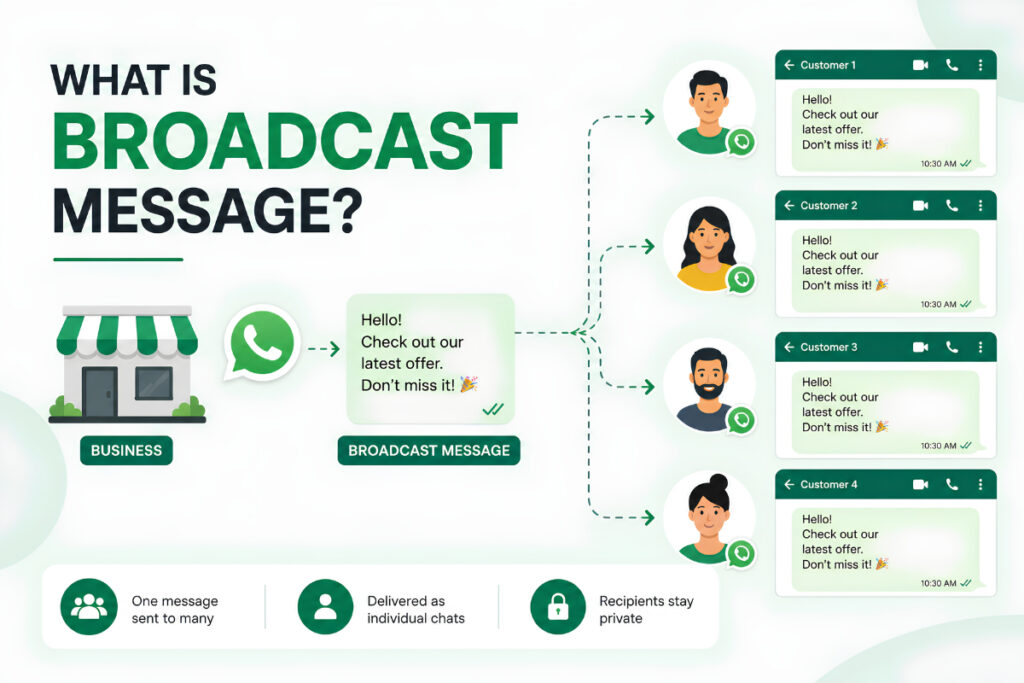
What Is a Broadcast Message?
A broadcast message is a communication sent from one sender to multiple recipients at once. Instead of creating one large conversation where every recipient can see everyone else, the message is delivered separately to each person.
For example, imagine a clothing store wants to tell 500 existing customers about a weekend sale. Instead of copying and pasting the same message 500 times, the business can create a broadcast campaign and send the announcement to the selected audience.
Each customer receives the message privately and can respond directly to the business.
This makes broadcast messaging particularly useful for businesses that need to communicate with many customers while keeping individual conversations separate.
How Does a Broadcast Message Work?
The process usually follows four basic stages:
- Create or select an audience
Choose the contacts who should receive the communication. - Prepare the message
Write the announcement, promotion, reminder, or update. - Send or schedule the broadcast
Deliver the message immediately or schedule it for a suitable time. - Handle responses and measure results
Monitor replies, engagement, clicks, and other available campaign metrics.
For business messaging platforms, audience segmentation and scheduling can make this process much more useful because you can send different messages to different customer groups rather than treating your entire contact database as one audience.
Broadcast Message vs Group Message
This is one of the most important differences to understand.
| Feature | Broadcast Message | Group Message |
|---|---|---|
| Communication style | One-to-many | Many-to-many |
| Recipient privacy | Recipients do not see each other | Members can see the group |
| Replies | Private conversation with sender | Visible within the group |
| Best for | Business updates and promotions | Community discussions |
| Personal conversation | Yes | No |
| Customer data visibility | Limited between recipients | More visible to group members |
A broadcast is therefore closer to sending the same individual message to many people than creating a traditional group conversation.
For a business, this distinction is important because customers usually do not need to know who else received a promotion, appointment reminder, or service update.
What Is a WhatsApp Broadcast Message?
A WhatsApp broadcast message is a message sent to multiple WhatsApp contacts through a broadcast list or a business messaging platform.
WhatsApp’s own Help Center states that people who have not added the sender’s number to their contacts may not receive messages sent through a broadcast list.
This makes the standard WhatsApp broadcast feature more suitable for businesses with an existing customer base that already knows and has saved the business number.
For larger campaigns, businesses may use the official WhatsApp Business Platform, which provides a more structured environment for business messaging, templates, automation, and integrations.
What Are Broadcast Messages Used For?
Broadcast messaging can be useful across different parts of the customer journey.
Promotions and Offers
Retailers can announce:
- Weekend sales
- Discount codes
- Seasonal offers
- New collections
- Flash sales
- Limited-time deals
Instead of sending a general promotion to every person, businesses can segment their audience and send offers based on previous purchases or interests.
Appointment Reminders
Clinics, salons, consultants, and service businesses can send appointment reminders before a scheduled visit.
For example:
Hi Priya, this is a reminder that your appointment is scheduled for tomorrow at 11:00 AM. Reply here if you need to reschedule.
The customer receives the reminder privately and can respond directly.
Order and Delivery Updates
E-commerce businesses can use WhatsApp messaging to keep customers informed about:
- Order confirmation
- Payment status
- Dispatch
- Delivery
- Delays
- Returns
These messages are useful because the customer receives important information without needing to contact support for every update.
Product Announcements
When launching a new product, businesses can notify customers who have previously shown interest in a particular category.
For example, a skincare brand could send a new-product announcement specifically to customers who previously purchased skincare products.
Customer Feedback
Broadcast messaging can also be used after a purchase or service interaction to request feedback.
A short message with a review link can make it easier for customers to share their experience.
Event and Business Updates
Businesses, educational institutions, event organizers, and service providers can use broadcasts for important announcements, schedule changes, event reminders, and other time-sensitive information.
What Are the Benefits of Broadcast Messaging?
Save Time
Sending one campaign to a selected audience is much faster than manually composing the same message for every customer.
Keep Conversations Private
Recipients receive the message individually instead of being placed into a shared conversation.
Reach a Targeted Audience
With proper segmentation, you can send a message only to customers who are likely to find it relevant.
Support Personalization
Business messaging platforms can use customer data to personalize messages with information such as names, order details, appointment times, or product interests.
Create Repeatable Campaigns
Once you have a structured audience and messaging process, you can create recurring campaigns for promotions, reminders, customer follow-ups, and announcements.
Broadcast Messaging vs Bulk Messaging
These terms are often used interchangeably, but there is a small difference in how they are commonly used.
Broadcast messaging describes the communication method, where one sender communicates with many recipients individually.
Bulk messaging generally describes the scale or volume of messages being sent.
For example, a business could send a broadcast to 200 customers, while a larger WhatsApp marketing platform may support campaigns reaching thousands of opted-in contacts.
The important thing is not the terminology. What matters is how the messages are sent, who receives them, and whether the communication follows the relevant messaging rules.
How to Create an Effective Broadcast Message
Sending a broadcast does not automatically make it effective. The message itself still needs to give customers a reason to read and respond.
1. Start With a Clear Purpose
Before writing anything, decide what you want the customer to do.
Do you want them to:
- Visit your website?
- Claim an offer?
- Confirm an appointment?
- Check an order?
- Reply to a question?
- Book a service?
A clear objective makes the message easier to write.
2. Keep the Message Focused
Do not turn a short WhatsApp message into a long promotional article.
For example:
Hi Rahul, our weekend sale is live. Get 20% off selected products until Sunday. Shop now: [link]
The customer immediately understands the offer, deadline, and next step.
3. Personalize Where It Makes Sense
Using the customer’s first name or relevant purchase information can make a broadcast feel more natural.
But personalization should have a purpose. Adding a name to an otherwise irrelevant message will not fix poor targeting.
4. Use a Clear Call to Action
Tell customers what they should do next.
Examples include:
- Shop now
- Book an appointment
- View products
- Track your order
- Reply to this message
- Claim your offer
5. Send to the Right Audience
One of the biggest mistakes in broadcast marketing is sending every message to everyone.
A customer who bought a product yesterday may not need the same re-engagement offer as someone who has not purchased in six months.
Audience segmentation helps solve this problem.
How Businesses Can Use Broadcast Messaging With Automation
Broadcast messaging becomes more powerful when it is connected to automation.
For example, instead of manually preparing every customer update, a business can create workflows that trigger messages after specific customer actions.
A customer places an order, and an automated confirmation is sent.
The order is dispatched, and another update is triggered.
The customer receives the delivery, and a follow-up message asks for feedback.
This type of workflow reduces repetitive work while keeping customers informed at the right stage of their journey.
WatConnect supports automated WhatsApp conversations triggered by orders, forms, and other user actions, helping businesses move from simple broadcasts toward automated customer communication.
When Should You Use Broadcast Messaging?
Broadcast messaging is a good fit when:
- You have an existing audience that has agreed to hear from your business.
- The same basic information is relevant to multiple customers.
- You need to communicate an update quickly.
- Your team wants to reduce repetitive manual messaging.
- You want to combine campaigns with customer replies.
It may not be the right approach when every customer requires a completely different message or when the communication involves sensitive information that needs individual handling.
How WatConnect Helps With WhatsApp Broadcast Messaging
For businesses that have moved beyond basic WhatsApp broadcasts, WatConnect provides tools for creating and managing larger WhatsApp campaigns.
Its bulk WhatsApp messaging solution supports pre-approved templates, campaign scheduling, automated responses, and two-way interactions.
WatConnect also provides template management, allowing teams to create, submit, manage, and monitor WhatsApp templates from a centralized dashboard.
The advantage is that broadcast messaging does not have to remain an isolated marketing activity. It can become part of a wider WhatsApp workflow that includes automation, customer support, analytics, chatbots, and API integrations.
Best Practices for Broadcast Messages
Keep these points in mind before sending your next campaign:
- Use a permission-based contact list.
- Send relevant information to the right audience.
- Keep promotional messages concise.
- Personalize messages when useful.
- Use approved WhatsApp messaging methods and templates where required.
- Give customers a clear way to stop unwanted marketing communication.
- Monitor delivery, engagement, replies, and negative feedback.
- Do not rely on broadcasts when a customer needs individual support.
The goal is not to send more messages. It is to send better messages to people who actually want to receive them.
FAQs About Broadcast Messages
What does broadcast message mean?
A broadcast message is one message sent from a sender to multiple recipients, with each recipient receiving it as an individual conversation rather than as part of a shared group chat.
What is a broadcast message on WhatsApp?
A WhatsApp broadcast message lets a business send the same communication to multiple contacts individually. Standard WhatsApp broadcast lists have specific recipient and contact requirements, while business platforms can provide more advanced campaign capabilities.
What is the difference between a broadcast and a group message?
In a broadcast, recipients receive the message privately and cannot see the other recipients. In a group message, members share the same conversation and can generally see other participants and their replies.
Can businesses use broadcast messages for marketing?
Yes. Businesses can use broadcasts for promotions, announcements, reminders, product launches, and customer updates, provided they follow the applicable WhatsApp business messaging requirements and communicate with an appropriate audience.
Are broadcast messages automated?
Not necessarily. A basic broadcast can be created and sent manually. With a business messaging platform, broadcasts can be combined with scheduling, templates, segmentation, automation, analytics, and customer support workflows.
Final Thoughts
A broadcast message is essentially a way to communicate one-to-many without turning the conversation into a group chat. For businesses, that makes it useful for promotions, reminders, announcements, customer updates, and other situations where the same information needs to reach multiple people while keeping each conversation private.
As your customer base grows, the real value comes from combining broadcasts with segmentation, personalization, automation, analytics, and two-way conversations. WatConnect brings these capabilities together with WhatsApp bulk messaging, templates, automation, chatbots, analytics, product catalogs, and API integrations.
If you want to move beyond basic broadcasts and build a more organized WhatsApp communication strategy, you can explore WatConnect and see how it fits your business workflow.